
Sinduja Shankar
Expert
Published on: Aug 10, 2026
Grievance Redressal Portal for GST
GST Grievance Redressal Portal (GRP) is an online portal that has been introduced by the Government which provides an effective resolution of grievances addressed by the taxpayers and other stakeholders. The objective is to ensure the online availability of the grievance redress machinery system to lodge complaints related to GST portal issues. Let us look in detail about the GST Grievance Redressal Portal (GRP) in this article.
To know about GST Helpline – How to Contact GST DepartmentFeatures of Grievance Redressal Portal
The following are some of the features of Grievance Redressal Portal that are listed below:
- This Grievance Redressal Portal facilitates the online lodging of grievances registered by the taxpayers which can be linked to their official portal.
- It is an integrated application system that is based on the technology which primarily aims at the submission of grievances by the users from anywhere and any time (24/7) basis for quick and easy communication.
- It facilitates the user with the generation of automated notifications like Acknowledgement and Final reply letters etc. for the official correspondence with the complainants.
- It mandates the uniform and systematic approach towards the monitoring of the process by adopting a general classification and standardisation of grievance and redress efforts across the government departments.
- This Grievance Redressal Portal facilitates the users with all required information and reduces to and fro communication between the help desk and the users to reach for the faster resolution.
- Enable the users to check the progress of resolution of the complaint, by using the ticket number which is an acknowledgement number that is generated after a complaint is lodged.
- The user needs to check for the resolution and comments in case the complaint or ticket is closed.
- The registered taxpayers are allowed to access the relevant FAQ page or pages of the user manual on the GST portal which helps to resolve problems/ issues based on the selected category or subject and sub-category.
- It also facilitates automatic data transmission Online Data transmission between the help desk and the registered users.
Procedure for Online Complaint Registration
To register a complaint under the
Grievance Redressal Portal, follow the steps mentioned below: Step 1: Firstly, the user has to visit the GST Portal to find a resolution or lodge any complaint related to GST portal related issues.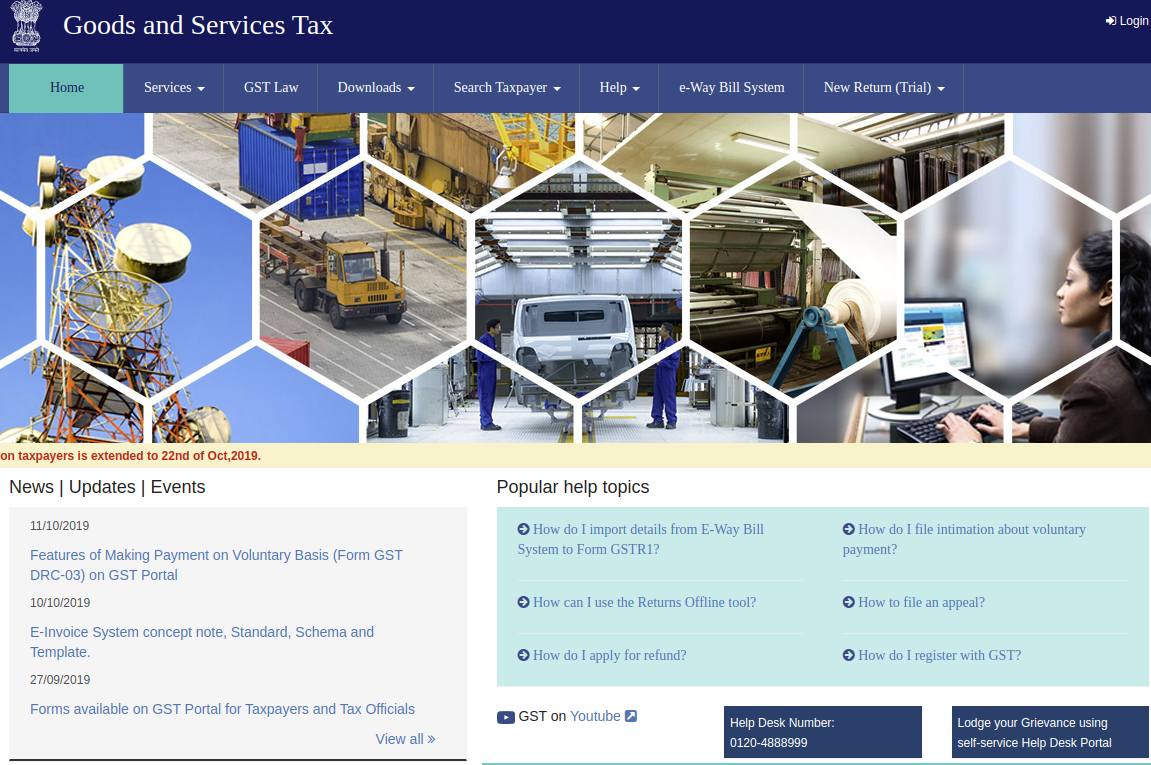 Step 1 - Grievance Redressal Portal (GRP) for GST
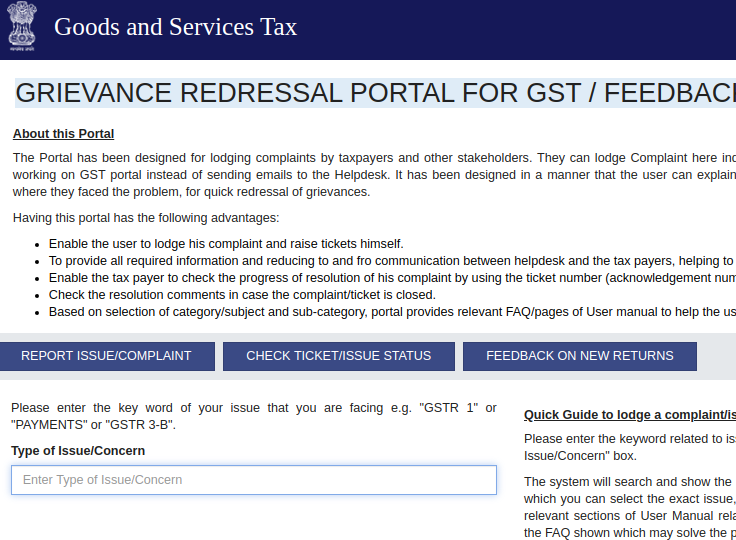
Step 2: Click on the “Grievance Redressal Portal for GST” link at the home page of the portal.
Step 1 - Grievance Redressal Portal (GRP) for GST
Step 2: Click on the “Grievance Redressal Portal for GST” link at the home page of the portal.
 Step 2 - Grievance Redressal Portal (GRP) for GST
Step 3: Upon clicking on the link it directs to the new page where the users can lodge a complaint related to GST portal related issues.
Step 4: Now, the user has entered the keyword related issue or complaint that is being faced by the users in the “Type of Issue or Concern” box under the reported issue or complaint tab.
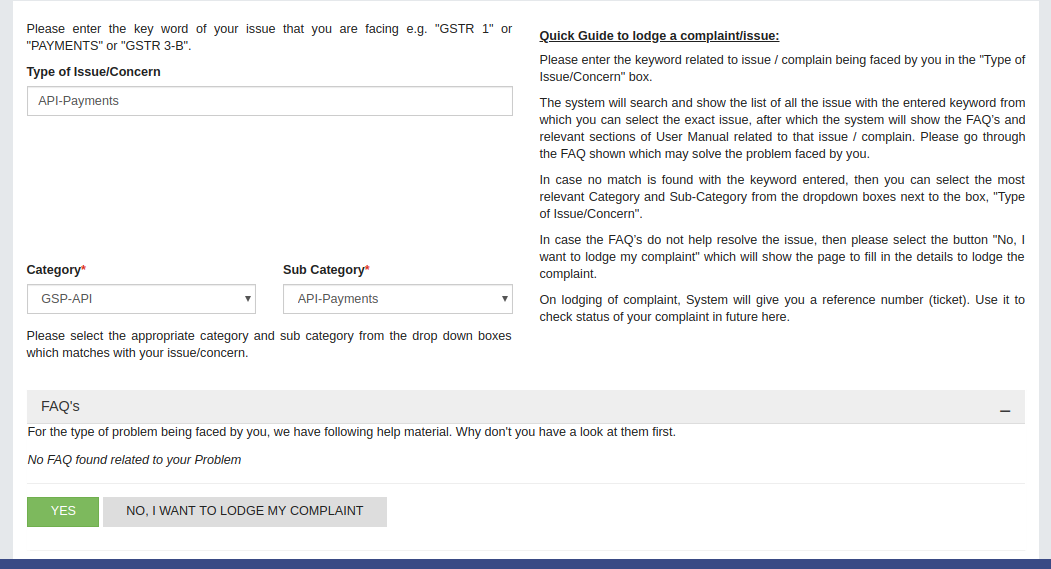
Step 5: After that, a list of all the issues will be displayed for the keyword that has been given. Now the user can select the exact issue from the drop-down list.
Step 2 - Grievance Redressal Portal (GRP) for GST
Step 3: Upon clicking on the link it directs to the new page where the users can lodge a complaint related to GST portal related issues.
Step 4: Now, the user has entered the keyword related issue or complaint that is being faced by the users in the “Type of Issue or Concern” box under the reported issue or complaint tab.
Step 5: After that, a list of all the issues will be displayed for the keyword that has been given. Now the user can select the exact issue from the drop-down list.
 Step 5 - Grievance Redressal Portal (GRP) for GST
Step 6: On selecting the issue, the system will display the faqs and relevant sections of the User Manual related to that issue or complain.
Step 7: The user will have to go through the FAQs that would solve the problems. In case if no match is found with the entered keyword, then the user can click on the most relevant category and sub-category from the dropdown list.
Step 8: In the case, the FAQs do not support or help to resolve the issue, then the user will have to select the “No, I want to lodge my complaint” that will show a page to fill in the details to lodge a complaint. The user can upload the relevant screenshots for the quick resolutions of the issues that are faced.
Step 9: On lodging of the complaint, System will generate a reference number (ticket number) by which the user can use it to check the status of the complaint in future by clicking on the “Check Tickets/ Issue Status” tab.
Step 5 - Grievance Redressal Portal (GRP) for GST
Step 6: On selecting the issue, the system will display the faqs and relevant sections of the User Manual related to that issue or complain.
Step 7: The user will have to go through the FAQs that would solve the problems. In case if no match is found with the entered keyword, then the user can click on the most relevant category and sub-category from the dropdown list.
Step 8: In the case, the FAQs do not support or help to resolve the issue, then the user will have to select the “No, I want to lodge my complaint” that will show a page to fill in the details to lodge a complaint. The user can upload the relevant screenshots for the quick resolutions of the issues that are faced.
Step 9: On lodging of the complaint, System will generate a reference number (ticket number) by which the user can use it to check the status of the complaint in future by clicking on the “Check Tickets/ Issue Status” tab.
Track Status of Complaint
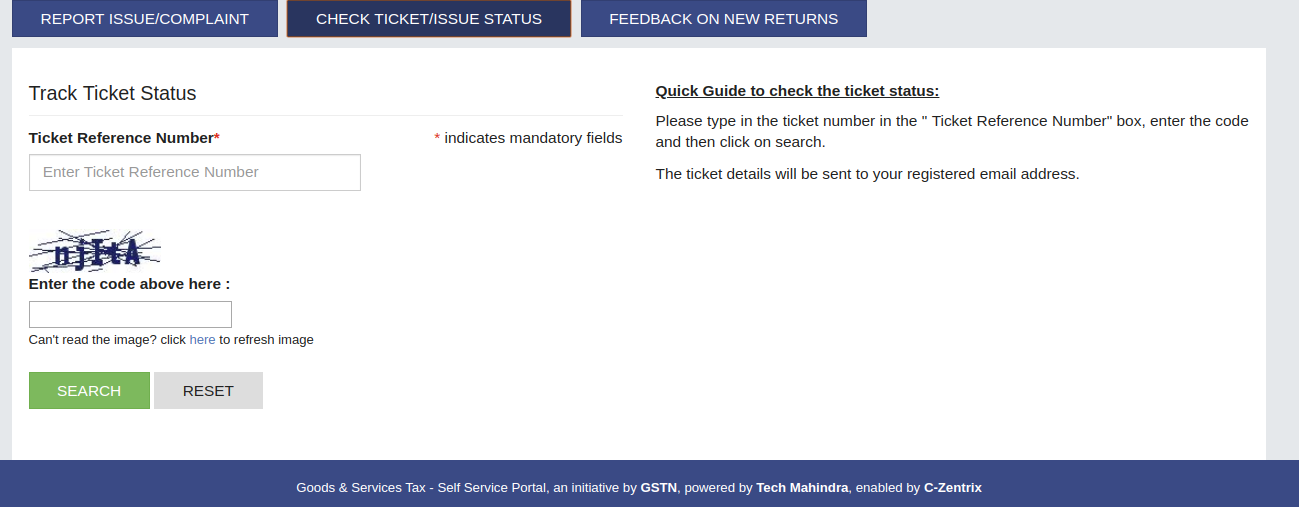
The user will need to enter the ticket number in the "Ticket Reference Number’ box, enter the code and then have to click on the search button. Now, the ticket details will be sent to the registered email address of the users.
 Track Status of Complaint - Grievance Redressal Portal