
Sreeram Viswanath
Expert
Published on: Jul 30, 2026
Generating EVC Through ATM
Taxpayers who have a taxable income which exceeds the basic exemption limit are required to file an income tax return every financial year. The return should be filed before the due date specified in the Income Tax Act. For taxpayers who are not required to undergo a tax audit, the due date is generally 31st July. When a taxpayer files income tax returns, the
returns should be verified to ensure that the information transmitted in the return has been furnished with the knowledge and assent of the taxpayer. In the initial days of the introduction of the concept of verification, the taxpayer had to send a copy of the acknowledgement to the Centralised Processing Centre (CPC), Bengaluru. However, in the present-day scenario of ubiquitous adoption of digital technology, verifying of tax returns has been made easier than before, on account of the e-verification facility provided by the Income Tax Department. Earlier, after filing an income tax return, the taxpayer would have to send a physical copy of the signed ITR-V acknowledgement to the CPC in Bangalore. Now, the verification can be completed through EVC or e-verification. However, taxpayers should note that Income Tax Returns can still be verified manually by furnishing it to Centralized Processing Centre (CPC), which is based at Bangalore. In this article, we briefly discuss the procedure for generating EVC through ATM.Electronic Verification Code
An Electronic Verification Code (EVC) is generated by the Income Tax Department for the e-verification of returns. Once generated, the code will be valid for 72 hours. If the user has not utilized it within this period, then the taxpayer is faced with the need to regenerate the code by performing the process from the beginning. While this article explores the procedure to obtain EVC through ATMs, EVC can also be generated through other methods, some of which are mentioned below:
- Using E-mail ID and mobile number
- Using Aadhar Card
- Using Net-banking
- Using bank account details
- Using Demat account
Process of Generating ATM EVC
The following procedures will help taxpayers in generating an EVC through an ATM: Step 1:- Visit your nearest ATM and swipe your debit/credit card. Step 2:- Among the options portrayed on the screen, select “Generate EVC for Income tax Filing." An EVC will be sent to your registered mobile number. The steps mentioned above conclude the process of generating EVC through this method. In the paragraphs elucidated below, we briefly examine the process of e-verifying the returns.
E-verify ITR
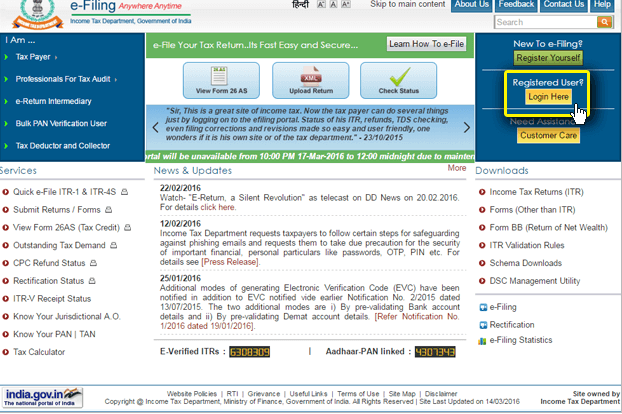
Step 1:- Visit the official e-filing website of the Income Tax Department Step 2:- You will be given three options on the top-right corner of the home page, click “Register yourself” if you haven’t registered with the portal; click “Login” if you have already done so.
 Generating EVC through ATM
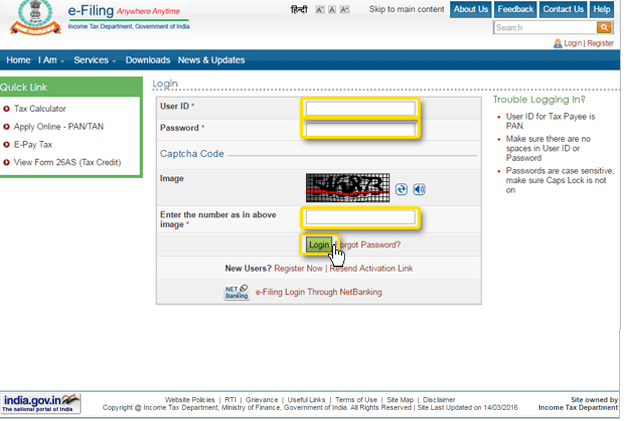
Step 3:- In the login page, you will be required to specify your “User ID” and “Password,” as well as the “Captcha Code”(the user ID will be your PAN Card number). Click “Login” to proceed.
Generating EVC through ATM
Step 3:- In the login page, you will be required to specify your “User ID” and “Password,” as well as the “Captcha Code”(the user ID will be your PAN Card number). Click “Login” to proceed.
 Generating EVC through ATM
Step 4:- On the “Dashboard” next page, choose “e Returns/Forms” from the “My Account” drop-down menu.
Generating EVC through ATM
Step 4:- On the “Dashboard” next page, choose “e Returns/Forms” from the “My Account” drop-down menu.
 Generating EVC through ATM
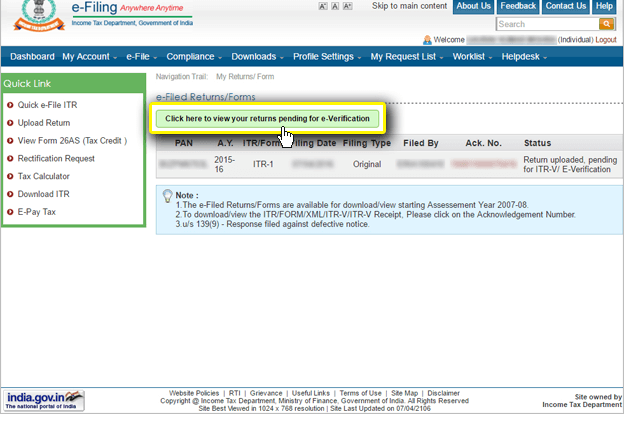
Step 5:- Now, select the option “Click here to view your returns pending for e-verification” tab.
Generating EVC through ATM
Step 5:- Now, select the option “Click here to view your returns pending for e-verification” tab.
 Generating EVC through ATM
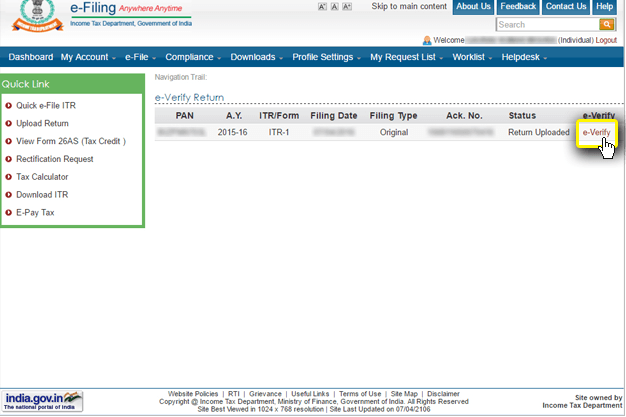
Step 6:- The following page will depict a list of returns to be verified, click on the “e-Verify” option adjacent to the particular returns.
Generating EVC through ATM
Step 6:- The following page will depict a list of returns to be verified, click on the “e-Verify” option adjacent to the particular returns.
 E-verification through ATM
Step 7:- You will be provided with three options for verification. In this scenario, it would be appropriate to select “Option 1 – I already have an EVC to e-verify my return” tab. The other two options will help you to generate an EVC through Aadhar and other means.
E-verification through ATM
Step 7:- You will be provided with three options for verification. In this scenario, it would be appropriate to select “Option 1 – I already have an EVC to e-verify my return” tab. The other two options will help you to generate an EVC through Aadhar and other means.
 Generating EVC through ATM
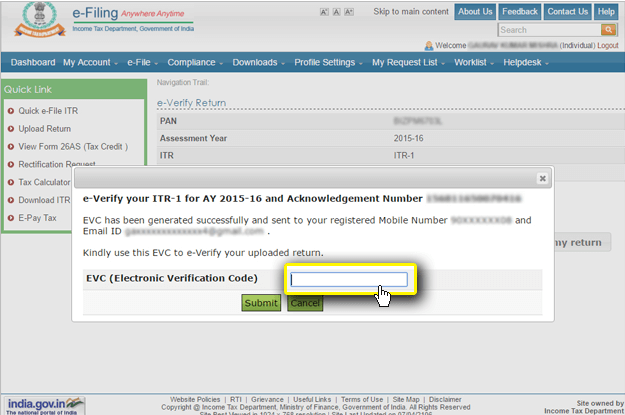
Step 8:- You can now verify your ITR by keying in the EVC derived through ATM.
Generating EVC through ATM
Step 8:- You can now verify your ITR by keying in the EVC derived through ATM.
 Generating EVC Through ATM
Learn about the concept of Tax Audit Turnover in Income Tax in detail!
Generating EVC Through ATM
Learn about the concept of Tax Audit Turnover in Income Tax in detail!