
Karthiga
Expert
Published on: Aug 17, 2026
Chennai Smart Parking System
The Greater Chennai Corporation (GCC) has proposed the new parking system using the "GCC Smart Parking" app to facilitate automated parking of vehicles in various locations across the city. GCC Smart Parking app enables the vehicle user to register their mobile number and vehicle number to get their parking slots before planning their journey. Through this new system, Chennai will be the first Indian city to implement an online parking management system. This article explains about the Gcc Smart Parking System in detail. Also, read about Tamil Nadu Vehicle TaxObjective
The key objectives of the Gcc Smart Parking System are listed below:- To improve the on-street parking management system.
- To ensure unclogged roads for smoother functioning on streets.
- To make effective usage of available parking space.
- To bring stronger enforcement laws against parking violations.
- To regulate parking charges for the vehicles from two-wheelers to four-wheelers.
Features of GCC Smart Parking App
The features of the GCC Smart Parking App are as follows:- Under the special project Smart City, Greater Chennai Corporation has taken an initiative to launch the smart parking system for the benefit of the public.
- The Gcc Smart Parking System app holds the complete details of parking space availability at various location in the city.
- As the GCC Smart Parking App is synced with the sensors will point out vacant slots using google maps.
- Upon booking a parking slot, the user will be provided with fare details and the duration of parking.
- The system can detect vehicles in no-parking areas, and this information will be sent to the enforcement manager to start the process of fine collection or towing of the vehicle.
- Once the vehicle is parked, the vehicle user can pay the charges for parking using online wallets.
- Also, e-Kiosks will be set up for the people without smartphones so that they can directly pay and receive parking slots.
Smart Parking Management System
Using the Gcc Smart Parking System, all residents will be able to locate their parking spots and use them after paying a fee. The parking spots will be observed by CCTV cameras covering the 80 locations and defaulters will be tracked by the Chennai Traffic Police. First Phase The first phase covers motorists visiting areas such as Besant Nagar, T.Nagar, Annar Nagar, Nungabakkam and Marina Beach in the first phase of the project. Under this first phase, almost 4,375 parking slots can be availed for bookings using the "GCC Smart Parking" app which can be downloaded from the Google Play Store. Second Phase In the Second Phase, the areas such as Royapettah, Mylapore and George Town will be covered with 5,300 parking slots. Totally, 25,000 parking slots will be covered in the smart parking system, which is based on artificial intelligence with 8-megapixel cameras monitoring the parking slots. Also, the Chennai Corporation has planned to launch a parking system for residents who don't possess parking space at home.GCC Smart Parking App
The GCC Smart Parking App is designed with several features of automated parking technology, including live chat option for posting queries related to payments, booking history, cancellation policy. Also, the payments for bookings can be made from their phones using internet banking facilities. In case of cancellation, the amount automatically gets reverted to your bank account.Procedure for Booking Parking Slots
To check and book your parking slot availability, follow the steps given below: Step 1: Visit Google Play store to download the "GCC Smart Parking" app. Step 2: After downloading the app, click on the "Sign up" button to register as the new user.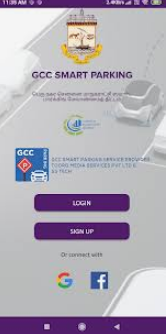 Gcc Smart Parking System - Login Page
Step 3: Now, provide basic details such as mobile number, mail id, address, vehicle type and vehicle number.
Gcc Smart Parking System - Login Page
Step 3: Now, provide basic details such as mobile number, mail id, address, vehicle type and vehicle number.
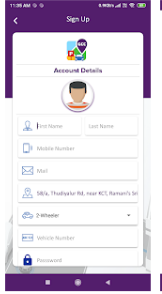 Gcc Smart Parking System - Account Details
Step 4: Then, the new user account will be created for accessing the app.
Step 5: In case of an existing user, click on " Login" button and provide the details of user name/id, password to login into the app.
Step 6: After creating your profile, the user has to click on "My bookings" option to book your parking slot.
Gcc Smart Parking System - Account Details
Step 4: Then, the new user account will be created for accessing the app.
Step 5: In case of an existing user, click on " Login" button and provide the details of user name/id, password to login into the app.
Step 6: After creating your profile, the user has to click on "My bookings" option to book your parking slot.
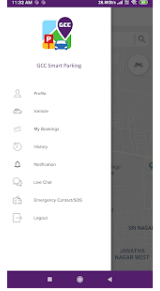 Gcc Smart Parking System - My Bookings
Step 7: Enter the respective area where the vehicle has to be parked and select the vehicle type, whether two-wheeler or four-wheeler and Click on the "Book Now" button.
Gcc Smart Parking System - My Bookings
Step 7: Enter the respective area where the vehicle has to be parked and select the vehicle type, whether two-wheeler or four-wheeler and Click on the "Book Now" button.
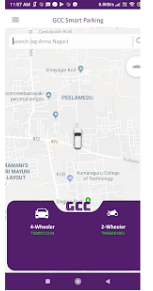 Gcc Smart Parking System - Book Now
Step 8: The user will be allocated with the parking slot and click on the "Pay" button to proceed further.
Step 9: After making the payment, your slot will be booked successfully.
Gcc Smart Parking System - Book Now
Step 8: The user will be allocated with the parking slot and click on the "Pay" button to proceed further.
Step 9: After making the payment, your slot will be booked successfully.
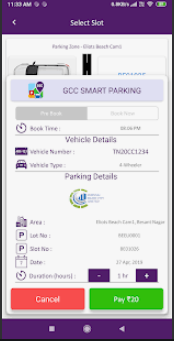 Gcc Smart Parking System - Pay Now