
IndiaFilings
Expert
Published on: Jul 30, 2026
How to File Nil GSTR 2 Return?
Nil GSTR 2 return should be filed by persons having
GST registration without any purchase transaction during a month. All taxpayers registered under GST are required to file monthly GST returns irrespective of sales, profitability or business activity. Hence, on obtaining GST registration, taxpayers must file GSTR 2 return, even if there is no business activity. In this article, we look at the procedure for filing nil GSTR 2 return.Filing Nil GSTR 2 returns
The registered taxpayer can file Nil GSTR 2 return when the taxpayer states NIL on inward supplies for the month. Under these circumstances with no purchases for the month, the taxpayer can file NIL GST returns.
Do I have to file nil GST return even if there is no turnover?
Yes, nil GST return must be filed by all taxpayers even if there is no business activity, sales or purchases. If GST returns are not filed, a penalty of Rs.100 per day shall apply.
Click here to read on GSTR 1 Return FilingProcedure for Filing Nil GSTR 2 Return
If you are using LEDGERS
GST Sofware, you can file GSTR 2 return from the software itself. In case you would like to manually file nil GSTR 2 return, you can follow the below-mentioned steps:Procedure for filing nil GSTR1 return.
Step 1: Log in to your GST Account
Login to your GST account using GST user id and password on the
GST Portal.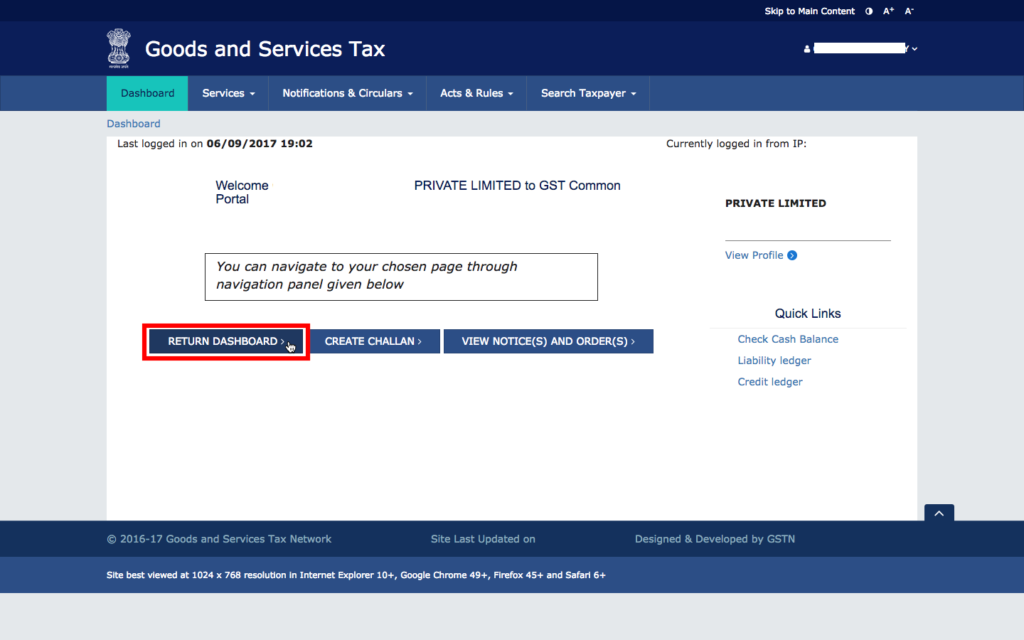 Step 1 - Login to GST Portal
Step 2: Select the return filing month
From the drop-down menu, select the return filing month and click on search.
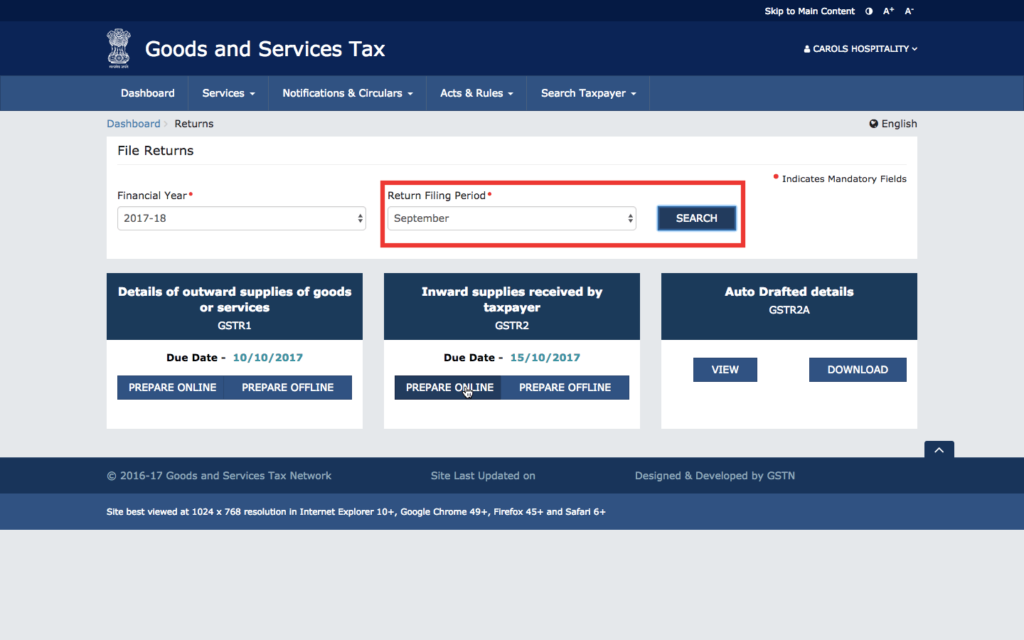 Step 2 - Select the GSTR2 Return Filing Month
Step 3: Click on auto-drafted GSTR 2A
GSTR 2A contains the auto-populated part of GSTR 2 return. Before filing nil GSTR 2 return, ensure that there are no auto-populated invoices or credit/debit notes in GSTR 2A.
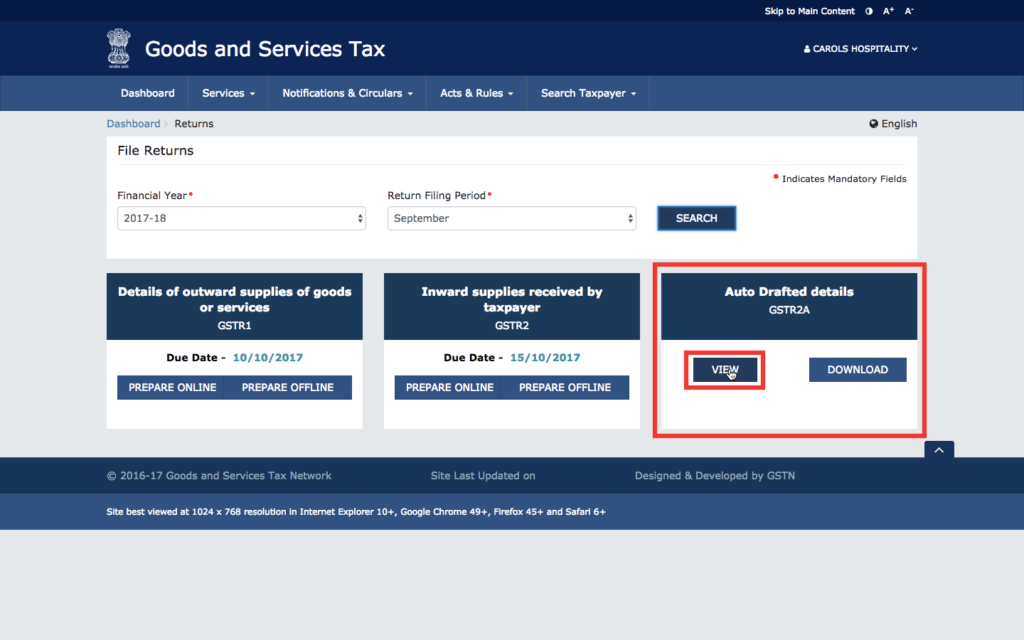 Step 3 - Verify the Auto Drafted GSTR2A
Step 4: Verify details in the aut0-drafted GSTR 2A
The GST portal auto-populates most of the data for GSTR 2 returns as per the information provided for GSTR 1. Hence, if a person registered under GST mentions that the concerned individual supplied goods to your GSTIN, then the respective B2B invoice, credit/debit note amendments and TDS/TCS credit shall reflect in GSTR 2A.
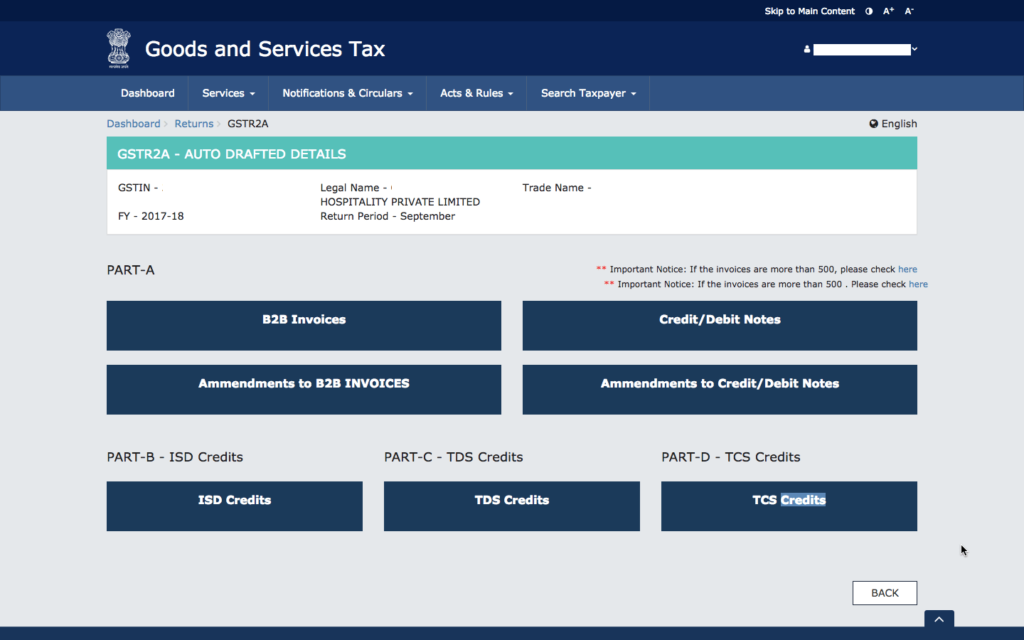 Step 4 - GSTR2A dashboard
In the case of nil GSTR 2 return, the auto-drafted GSTR 2A should not have any information or record as shown below.
Step 4 - GSTR2A dashboard
In the case of nil GSTR 2 return, the auto-drafted GSTR 2A should not have any information or record as shown below.
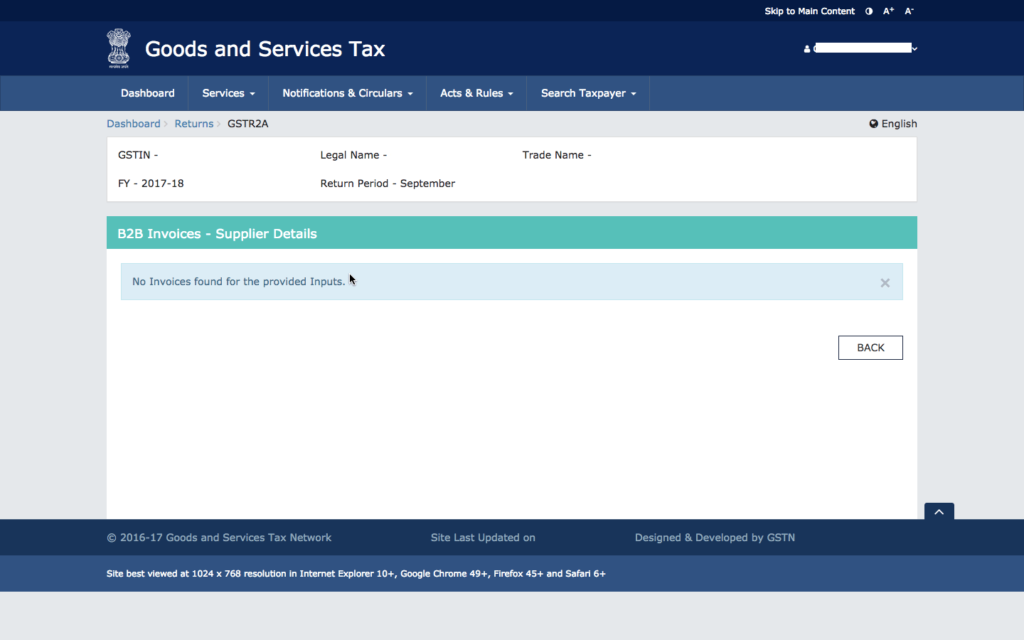 Step 4A - Ensure there are no records in GSTR2A
Step 5: Begin preparing GSTR 2
Once you have verified that there is no auto-populated data, go back to the returns dashboard and click on prepare GSTR 2 online as shown below.
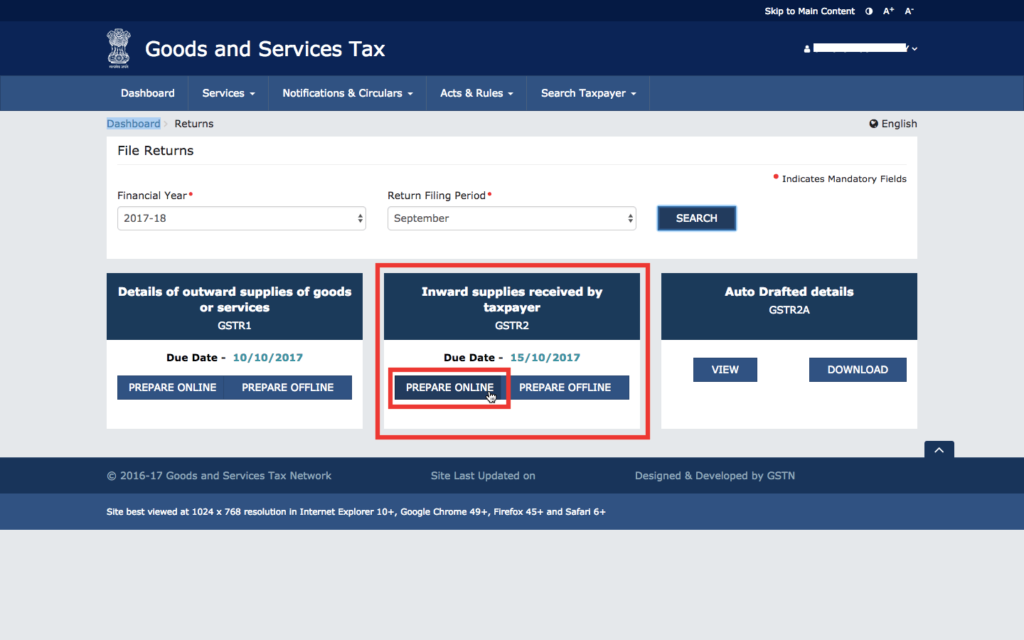 Step 5 - Click on Prepare GSTR2 Online
Step 6: Ensure that GSTR 2 return is nil
In the GSTR 2 summary, ensure that there is no data and all sections of GSTR 2 return is nil as shown below:
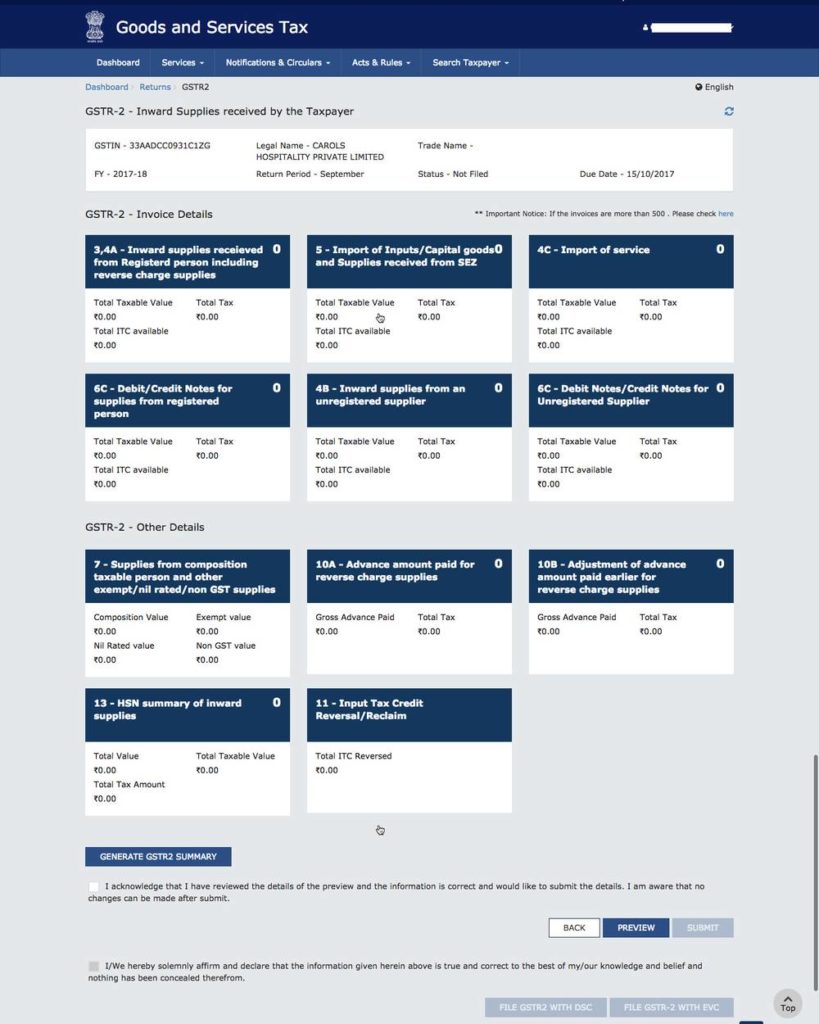 Step 6 - Verify GSTR2 Return Summary
Step 7: Download and preview the GSTR 2 Return
Once you have verified that GSTR 2 return does not contain any information, click on the preview button to download GSTR 2 summary in pdf format. A sample nil GSTR 2 return in pdf format from GST Portal is attached below:
Step 8: Submit the nil GSTR 2 return
Once you have verified that the GSTR 2 return is nil, click on submit to file the GSTR 2 return. Once the nil GSTR 2 return is filed, you will not be able to rectify. Once the return is submitted, click on file GSTR 2 with DSC or file GSTR 2 with EVC to complete the GSTR 2 return filing process.
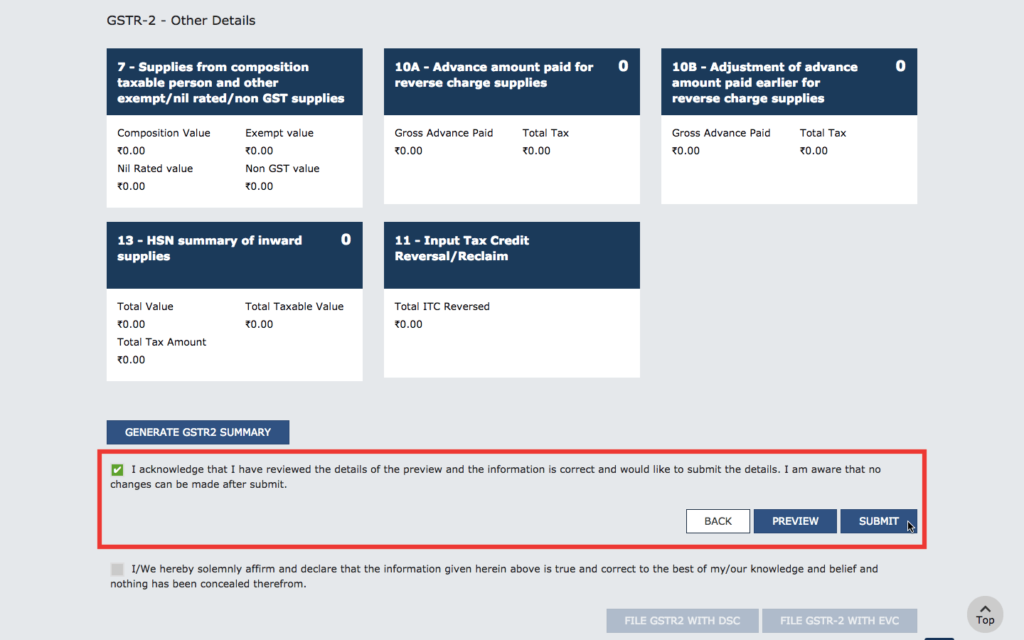 Step 8 - Submit Nil GSTR2 Return