

Renu Suresh
Expert
Published on: Aug 12, 2026
ESIC Online Payment
The Employees' State Insurance (ESIC) Scheme aims to provide hassle-free services to both employers and employees through its information and services portal. As part of this effort, all filing and payments are done through an online portal. Employers can remit monthly ESIC contributions through the portal. In this article, we will look at procedure for making ESIC online payment in detail. Know more about ESIC Registration for BusinessESIC Monthly Contribution Rate
- Currently, the employee's contribution rate is 1.75% of the wages, and the employer's contribution is 4.75% of the wages paid or payable in respect of the employees in every wage period.
- For newly implemented areas/firms, the contribution rate is 1% of wages of Employee and 3% payable by Employers for the first two years.
Due Date for Payment of Monthly Contribution
An employers are liable to pay ESIC contribution in respect of every employee and deduct employee's contribution from wages and pay these contributions at the rate specified to the ESIC within fifteen days of the last day of the month in which the contributions fall due.- If ESIC monthly contribution due for a particular month is Rs.1000/- an employer has created an offline system generated Challan for the payment towards Rs.1000/-, then the employer cannot make an online payment towards the same even if the earlier challan is not deposited or unrealised.
- If ESIC monthly contribution due for a particular month is Rs.1000/- an employer has created an Offline System Generated Challan for payment towards Rs.700/- which is not realised, then the Employer can make Online Payment towards only the remaining amount, i.e. Rs 300/.
- The employer has initiated an Online Payment for Rs 200 against total dues of Rs 1000. If the transaction fails, the employer cannot modify the challan amount during Online Double Verification. The employer has first to complete this transaction and then can do another transaction to make balance payment of Rs 800.
Procedure for ESIC Online Payment of Monthly Contribution
The procedure for online payment of monthly contribution is explained in detail below: Step 1: Login to the ESIC portal using the user ID and Password which is provided during the Registration. Step 2: After successful login, the above page as depicted in the image will be displayed with hyperlinks under each module which again redirects to specific sections.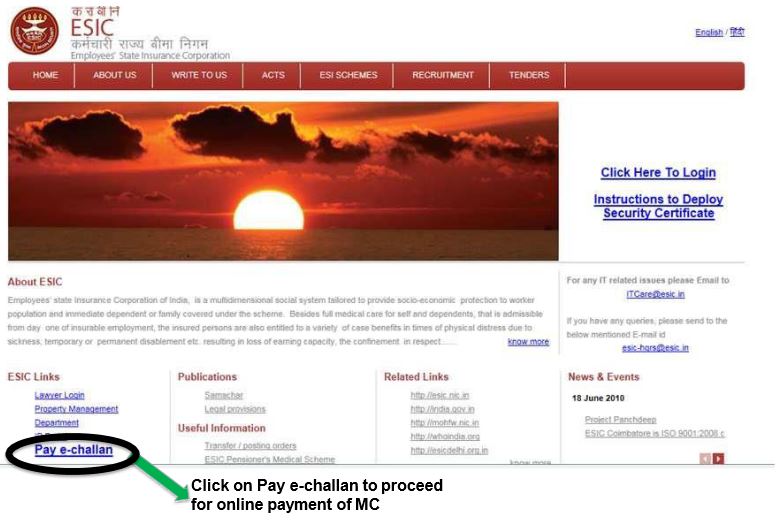 Image 4 Online Payment of ESIC Monthly Contribution
Step 3: The user can file the monthly contribution using the “Online Monthly contribution Screen.
Image 4 Online Payment of ESIC Monthly Contribution
Step 3: The user can file the monthly contribution using the “Online Monthly contribution Screen.
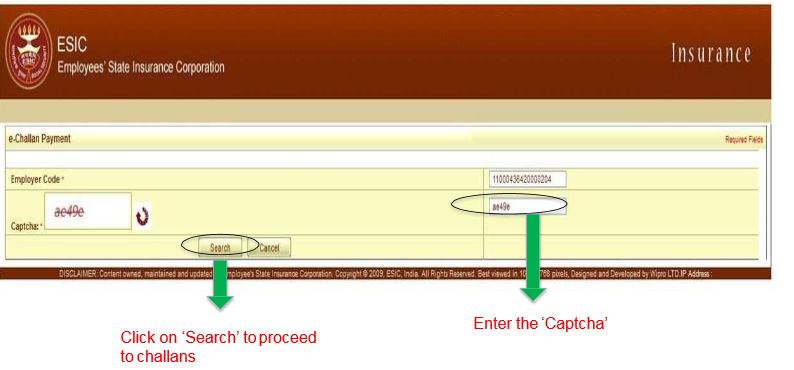 Image 5 Online Payment of ESIC Monthly Contribution
Step 4: On clicking on this option, “preview” page will be displayed.
Image 5 Online Payment of ESIC Monthly Contribution
Step 4: On clicking on this option, “preview” page will be displayed.
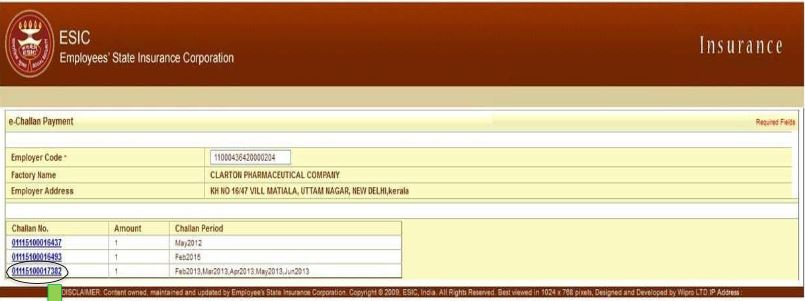 Image 6 Online Payment of ESIC Monthly Contribution
Step 5: For submitting the monthly contribution details to ESIC click on the “Submit” button.
Image 6 Online Payment of ESIC Monthly Contribution
Step 5: For submitting the monthly contribution details to ESIC click on the “Submit” button.
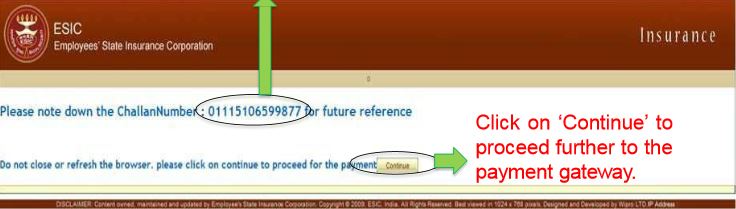 Image 7 Online Payment of ESIC Monthly Contribution
Step 6: The employer can manually type the contribution against each employee or can upload an excel file as an attachment to bulk upload. This is quite user-friendly for bulk data.
Image 7 Online Payment of ESIC Monthly Contribution
Step 6: The employer can manually type the contribution against each employee or can upload an excel file as an attachment to bulk upload. This is quite user-friendly for bulk data.
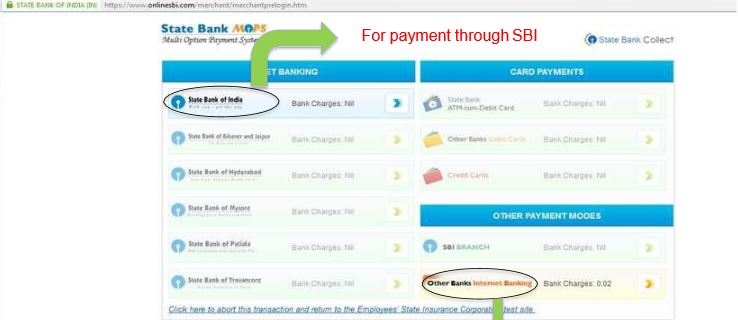 Image 8 Online Payment of ESIC Monthly Contribution
Step 7: After submission, the user can make the MC online payment via respected bank internet banking by clicking on Pay online option.
Image 8 Online Payment of ESIC Monthly Contribution
Step 7: After submission, the user can make the MC online payment via respected bank internet banking by clicking on Pay online option.
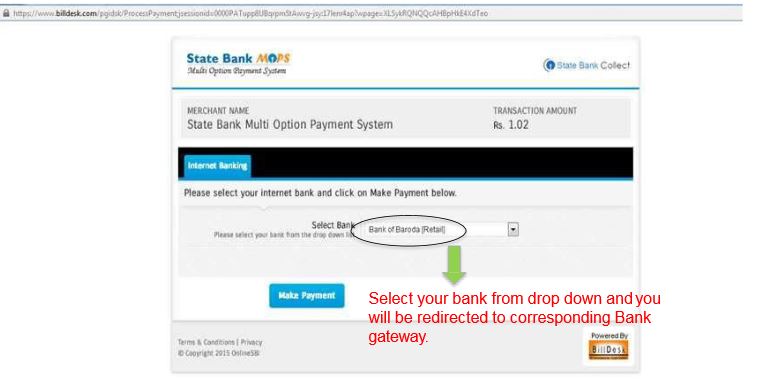 Image 9 Online Payment of ESIC Monthly Contribution
Step 8: Click on the “ok” option to proceed further with the online payment.
Image 9 Online Payment of ESIC Monthly Contribution
Step 8: Click on the “ok” option to proceed further with the online payment.
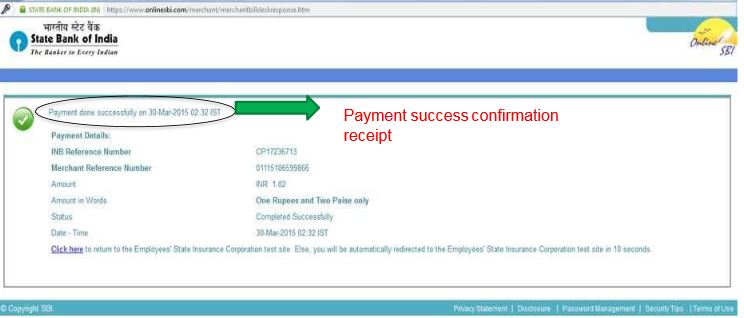 Image 10 Online Payment of ESIC Monthly Contribution
Step 9: Please note down the Challan number for future reference. Click on the continue to proceed for the payment; this will redirect to SBI bank online payment page.
Step 10: As soon as you proceed for payment, it will be redirected to the banking site where online payment is made. The user needs to provide net banking credentials for making the payment.
Step 11: In case the user paid monthly contribution via SBI, the following screen will be displayed after clicking on the confirm button, which shows the success page.
Image 10 Online Payment of ESIC Monthly Contribution
Step 9: Please note down the Challan number for future reference. Click on the continue to proceed for the payment; this will redirect to SBI bank online payment page.
Step 10: As soon as you proceed for payment, it will be redirected to the banking site where online payment is made. The user needs to provide net banking credentials for making the payment.
Step 11: In case the user paid monthly contribution via SBI, the following screen will be displayed after clicking on the confirm button, which shows the success page.
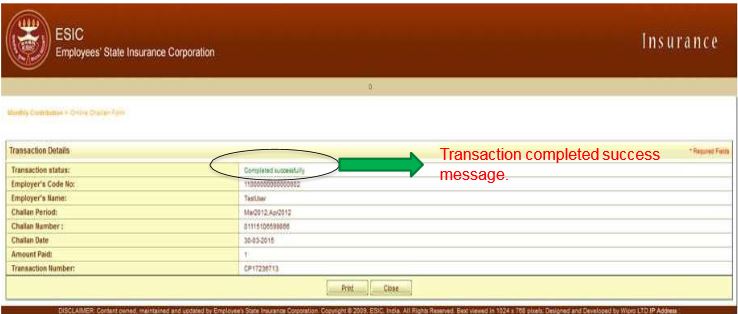 Image 11 Online Payment of ESIC Monthly Contribution
Generate Challan Online
The following steps need to be performed to generate the challan online. Step 12: After login to the portal, click generate Challan link, the screen will be redirected to a new page, click on view button. Step 13: The records against which the payment is to be made by the employers should be selected, provide the amount users want to pay. Step 14: Select the online option and click on the submit button. A message will be displayed, and the user should click on the OK option on the message.Verify the Payment
Follow the below mentioned steps for reprinting or cross-checking of the successful transaction. Step 15: Select the last button on the right side, which shows as Online Challan Double verification. Step 16: Double verification of Challan page will be shown. Now provide the Employer’s code number and challan number in the text box and click on submit. Step 17: You can print the success page by clicking on the Print option.Processing the Failed Transaction
Processing the failed ESIC monthly contribution transaction is explained in detail below:Reason for Failed Transaction
The transaction can be failed due to the following reasons:- Transaction failing due to connectivity issues
- Funds shortage
- User forgot the login id and password
- Failure of the ESIC site in redirecting the online SBI payment page
- Transaction unsuccessful due to link issue