

Renu Suresh
Expert
Published on: Aug 12, 2026
EPF Form 2 - Nomination Form
Employees’ Provident Fund (EPF) is a form of a social security scheme in which employees must contribute a portion of their salary and the employer also contributes to this fund on behalf of workers. Every employee has to submit a nomination under the Employees’ Provident Fund Scheme, 1952 and Employees’ Pension Scheme, 1995. The employee has to file a nomination form through the EPF Form 2 so that the nominated person gets the fund accumulated in the EPF account in case of unfortunate death of the employee.Conditions for Nomination
- The nomination should be in favour of the one or more members of the family
- If the EPF member has no family, he or she can nominate anyone. In case of the employee has family members, he cannot nominate anybody out of the family.
- Once an unmarried employee marries, he will have to file a fresh nomination again
- The subscribers can change their nomination whenever they want
- In case of more than one family member is mentioned as nominees, a defined percentage of the amount to will be issued to each
- Every person who joins an EPF qualified establishment (where 20 or more persons are employed) on or after 16-11-1995 is compulsorily required to join the EPS
- Minimum ten years of eligible service will entitle the employee for a pension
Details for Nominating Family Members
As described above, a married employee with his or her parents and those who are dependent on the employee or without parents can nominate one or more family members. A member has to keep the following points in mind while nominating the family member(s) through Form 2:In Employees’ Provident Fund Scheme
Employee’s Provident Fund Scheme defines family as follows: The male employee can file following family members as nominees:- Wife
- Children
- Dependent parents and
- Widow of son and children
- Husband
- Children
- Dependent parents
- Husband’s dependent parents
- Spouse’s dependent parents
- Widow of son and children
- Minor son and unmarried daughter of employees
- Spouse of the employee
- Adopted daughter or son who was adopted before the death of an employee.
Submission Limit
There is no limit for EPF, and the member can change his nominations as many times as he wants.Attributes in EPF Form 2
The EPF form 2 contains the following details in the application form.General Information
General Information such as Name of the member, Father’s/Husband’s Name, Date of Birth, Gender, Marital Status, Account Number, Address Permanent & Temporary and Date of Joining in EPF and EPS.Nomination details
In this section, EPF account holder has to provide information about the nominee whom he or she would like to nominate to receive EPF account balance in case of his or her death. Following details have to be furnished in this section:- Name of the Nominee
- Address
- Nominee’s relationship with the member
- Date of Birth
- The total amount or share of accumulations in Provident Funds (PF) to be paid to each nominee
- In case of the nominee is a minor, name and address of the guardian who will receive the amount during the minority of the nominee
- Signature or thumb impression of the subscribers
Eligibility for Widow/Children Pension
EPS is the abbreviation of Employees’ Pension Scheme, 8.33% out of 12% of employer’s contribution in EPF will be deposited in the EPS account of the member. The EPS proceeds of a member’s Provident Fund account is also disbursed to eligible nominees. This section needs you to furnish details of the family members eligible to receive the pension. The EPF member has to mention the following details in this section:- Name of the family member
- Address of the family member
- Date of Birth
- Relationship with the member
- Signature or thumb impression of the subscriber
- Name and address of the nominee
- Date of Birth
- Relationship with member
Time Period
Any time after getting enrolled in the EPF scheme, the members can file the EPF form 2. Both online and offline facilities are available for filling EPF Form 2.Documents Required
No additional documents are required for filing nomination in EPF Form 2.e-Nomination Online Procedure
A member who has already registered the UAN at the unified EPF Member Portal can fill his/her e-Nomination online. In case you have not registered yourself at the EPF member portal, you will have first to activate your UAN and then follow these simple steps for e-Nomination: Step 1: Access the home page of EPF member portal, Login to the EPF member portal using the UAN and password.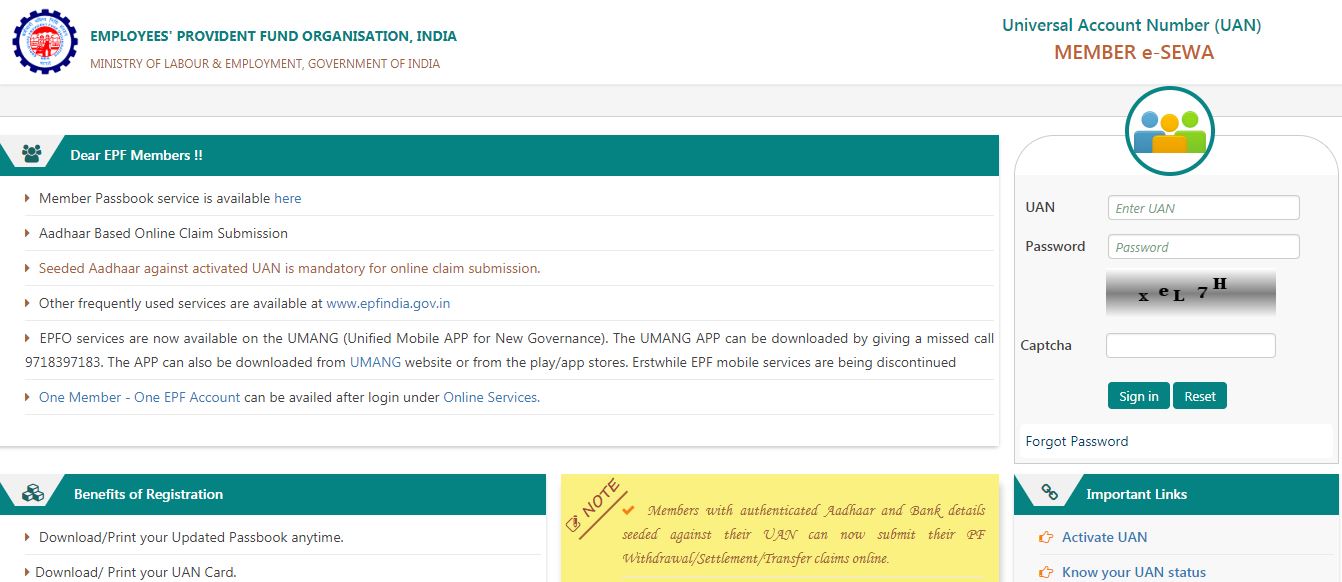 Image 1 EPF Form 2 - Nomination Form
Step 2: Select the “e-Nomination” option from the “Manage” section.
Image 1 EPF Form 2 - Nomination Form
Step 2: Select the “e-Nomination” option from the “Manage” section.
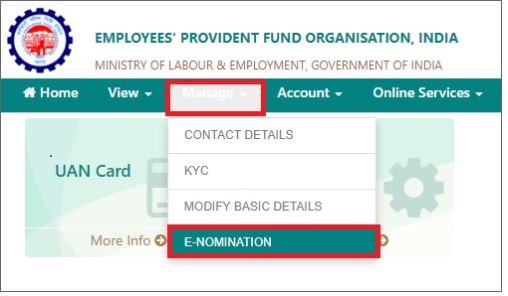 Image 2 EPF Form 2 - Nomination Form
Step 3: A new window will appear, give your “Permanent Address” and “Current Address” in the “Profile” and click on “Save” option.
Image 2 EPF Form 2 - Nomination Form
Step 3: A new window will appear, give your “Permanent Address” and “Current Address” in the “Profile” and click on “Save” option.
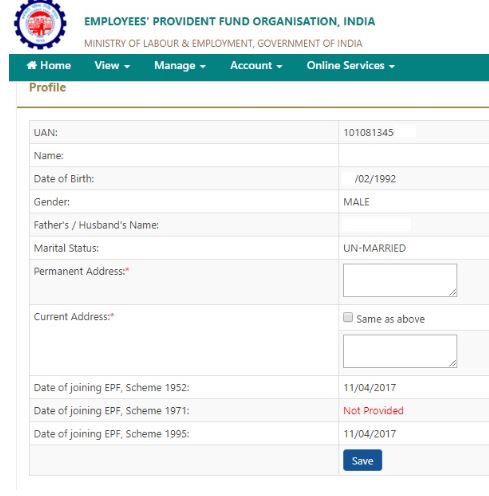 Image 3 EPF Form 2 - Nomination Form
Step 4: Select the details of the family; provide details of the family member such as Aadhaar number, name, and date of birth, gender, relation, address, guardian and click on the Save Family Details option. In case you wish to add more nominees details, select the “Add Row” option.
Image 3 EPF Form 2 - Nomination Form
Step 4: Select the details of the family; provide details of the family member such as Aadhaar number, name, and date of birth, gender, relation, address, guardian and click on the Save Family Details option. In case you wish to add more nominees details, select the “Add Row” option.
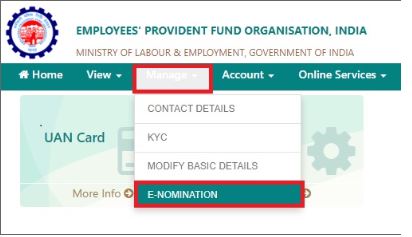 Image 4 EPF Form 2 - Nomination Form
Step 5: Now select the nominee's name from the list and enter the total amount of share. Now click on “Save EPF Nomination option.
Image 4 EPF Form 2 - Nomination Form
Step 5: Now select the nominee's name from the list and enter the total amount of share. Now click on “Save EPF Nomination option.
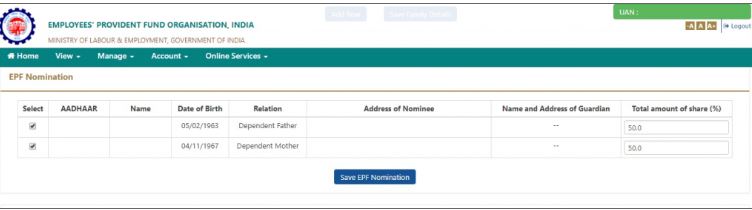 Image 6 EPF Form 2 - Nomination Form
Step 6: Your nomination details will be updated, and the nominees will get the fund in the proportion mentioned in the EPF form 2.
Note: Follow the same steps for the EPS section for availing benefits of the pension scheme.
Image 6 EPF Form 2 - Nomination Form
Step 6: Your nomination details will be updated, and the nominees will get the fund in the proportion mentioned in the EPF form 2.
Note: Follow the same steps for the EPS section for availing benefits of the pension scheme.