
Bennisha
Expert
Published on: Jul 30, 2026
Deferred Payment of GST
The GST Act facilitates the taxpayers to make deferred payments and to make payments in instalments. An application for this cause should be made in form GST DRC - 20. This application can be filed by a taxpayer to apply for one of the following two options when the payment cannot be done in one go.
- Deferred payment: When the payment due is deferred at a later stage.
- Payment in instalments: When the due is paid in instalments.
Time Line of Form GST DRC - 20
Form GST DRC - 20 can be filed when the demand is pending for recovery under the GST Act against the taxpayer and when the taxpayer applies for deferred payment or makes a payment in instalments of an amount due under the GST Act.
Payment using Form GST DRC - 20
The application for deferred payment using Form GST DRC - 20 cannot be filed against return related demands. However, the provisions for the application for deferred payment using Form GST DRC -20 other than return related demands are posted in Liability Register Part - B.
Application Procedure
Given below is the application procedure for deferred payment or payment in instalments of an amount due under the GST Act.
FIlings an application for Deferred Payment or Payment in Instalments
Step 1: Login to the Portal The taxpayer has to login to the official GST Portal. Step 2: Enter the Credentials The taxpayer has to enter the appropriate credentials. Step 3: Click on My Applications The taxpayer has to click on the 'Dashboard' tab, then 'Services' and then the 'User Services' option. From this option, click on 'My Applications'.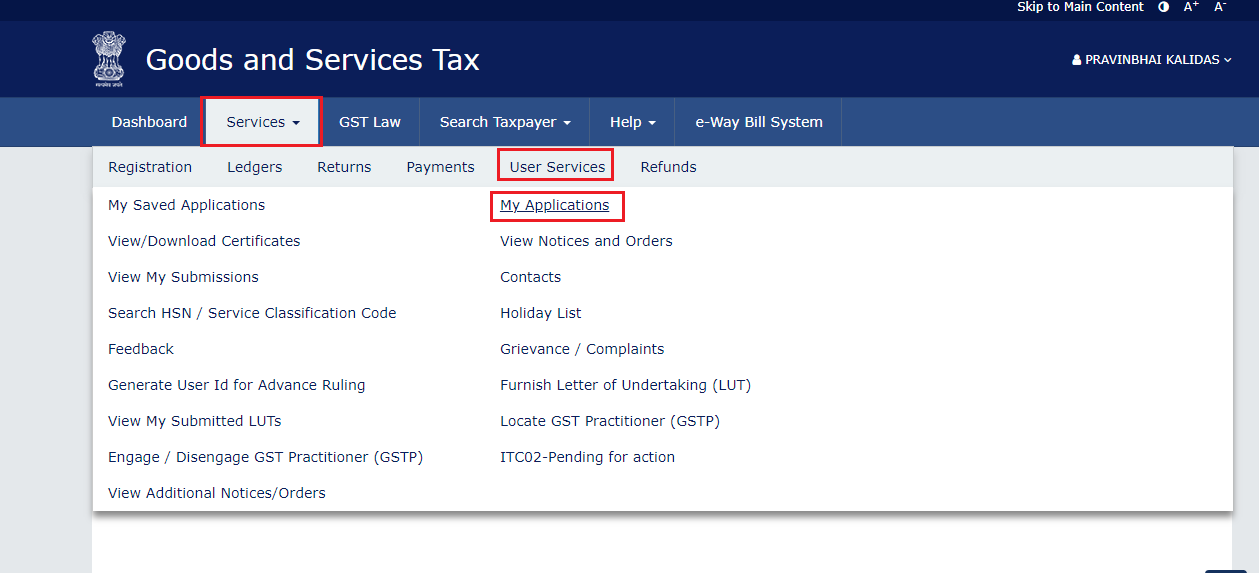 Step 3-Applying for Deferred Payment of GST
Step 4: Click on New Application
From the 'Application Type', select 'Application for Deferred Payment/ Payment in Instalments' and then click on the 'New Application' button.
Step 5: Enter the Details
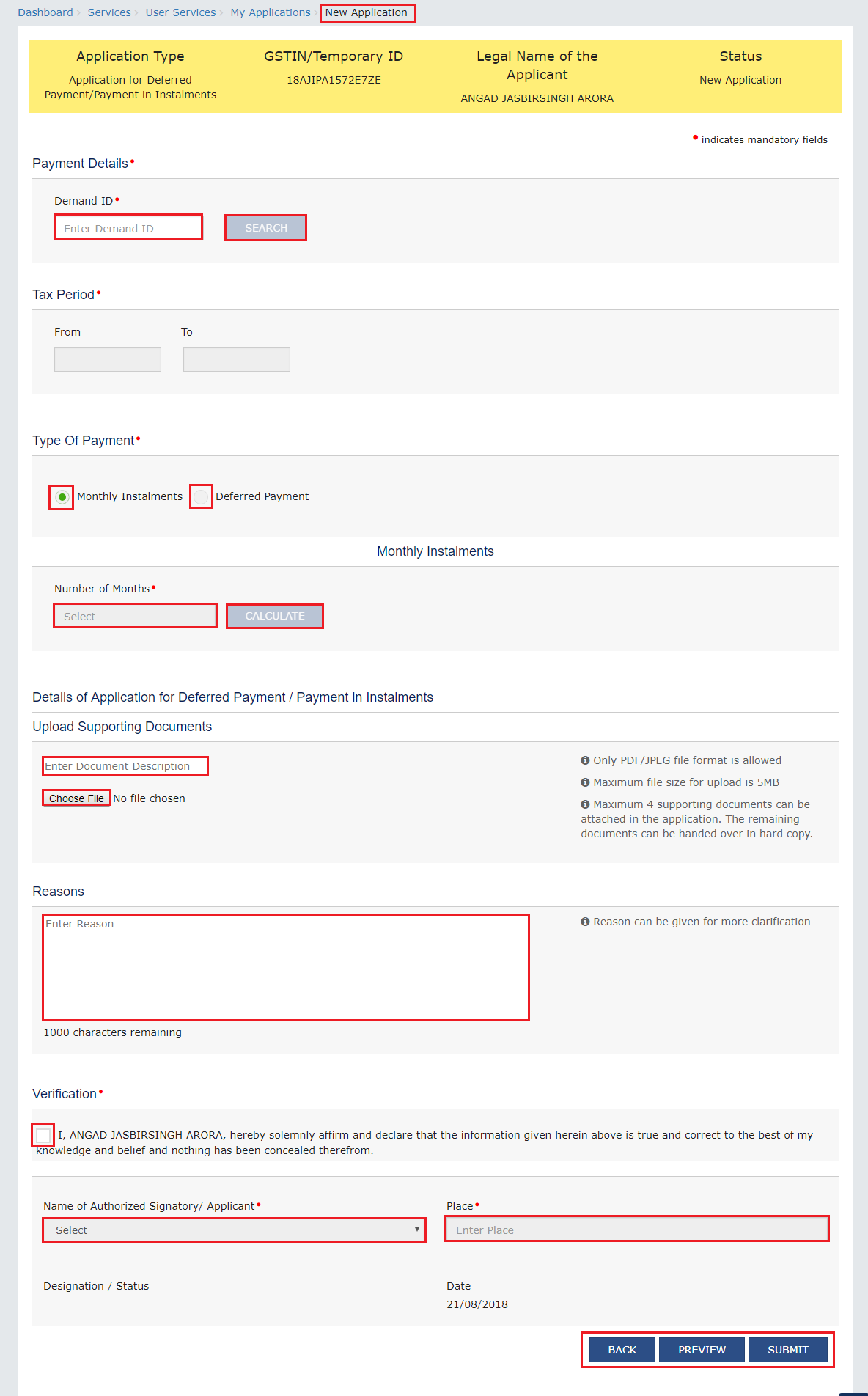
In the 'New Application' page, the taxpayer has to enter the details. An alternate method for this procedure is, the taxpayer click on 'Dashboard' option, 'Services' option, 'Payments' and then select 'Application for Deferred Payment/ Payment in Instalments.
Step 3-Applying for Deferred Payment of GST
Step 4: Click on New Application
From the 'Application Type', select 'Application for Deferred Payment/ Payment in Instalments' and then click on the 'New Application' button.
Step 5: Enter the Details
In the 'New Application' page, the taxpayer has to enter the details. An alternate method for this procedure is, the taxpayer click on 'Dashboard' option, 'Services' option, 'Payments' and then select 'Application for Deferred Payment/ Payment in Instalments.
 Step 5-Applying for Deferred Payment of GST
Step 6: Auto-population of Tax Period
In the 'Demand ID', the taxpayer has to enter the demand ID and then click on the 'Search' button. The outstanding demand gets displayed below the Search field. The 'Tax Period' is auto-populated.
Step 7: Monthly Instalments or Deferred Payment
In the 'Type of Payment' field, the taxpayer has to choose either the 'Monthly Instalments' or 'Deferred Payment' options.
Step 5-Applying for Deferred Payment of GST
Step 6: Auto-population of Tax Period
In the 'Demand ID', the taxpayer has to enter the demand ID and then click on the 'Search' button. The outstanding demand gets displayed below the Search field. The 'Tax Period' is auto-populated.
Step 7: Monthly Instalments or Deferred Payment
In the 'Type of Payment' field, the taxpayer has to choose either the 'Monthly Instalments' or 'Deferred Payment' options.
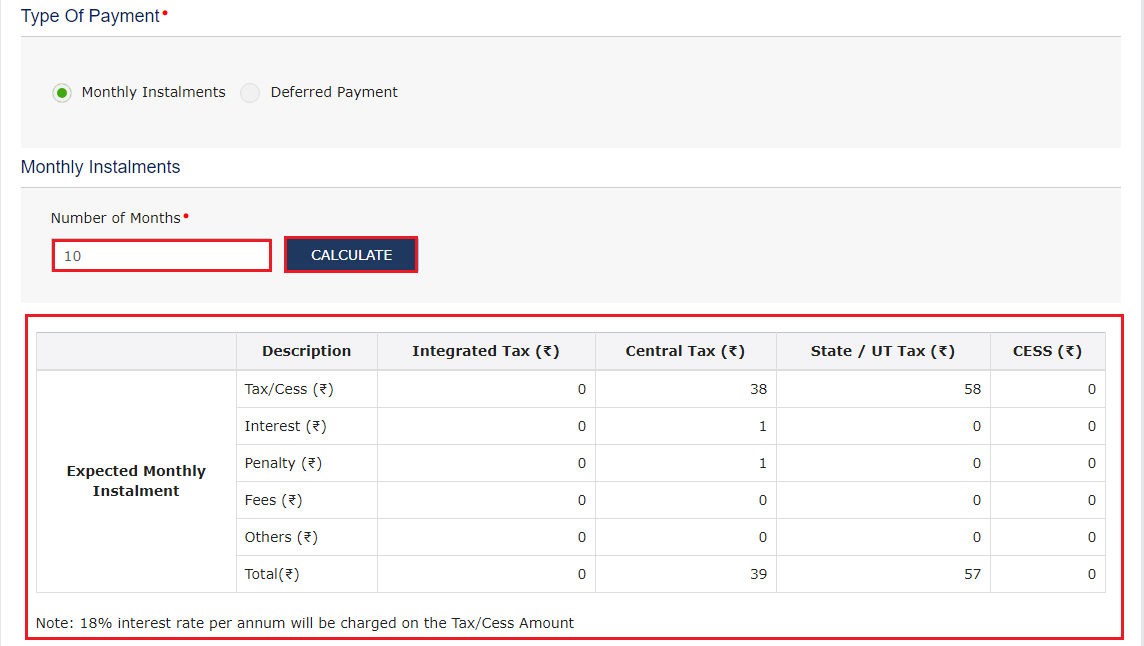
- If 'Monthly Instalments' option is selected, enter the number of months and click on 'Calculate' button. The 'Expected Monthly Instalment' is auto calculated and gets displayed on the screen. The per annum interest rate is mentioned under the table that will be levied on the Tax/ cess amount.
 Step 7-Applying for Deferred Payment of GST
The maximum instalment allowed for the taxpayer is 24.
Step 7-Applying for Deferred Payment of GST
The maximum instalment allowed for the taxpayer is 24.
- If the 'Deferred Payment' option is selected, the taxpayer has to select the appropriate 'Due date of payment' from the calendar.
 Step 12-Applying for Deferred Payment of GST
Step 13: Download the Application
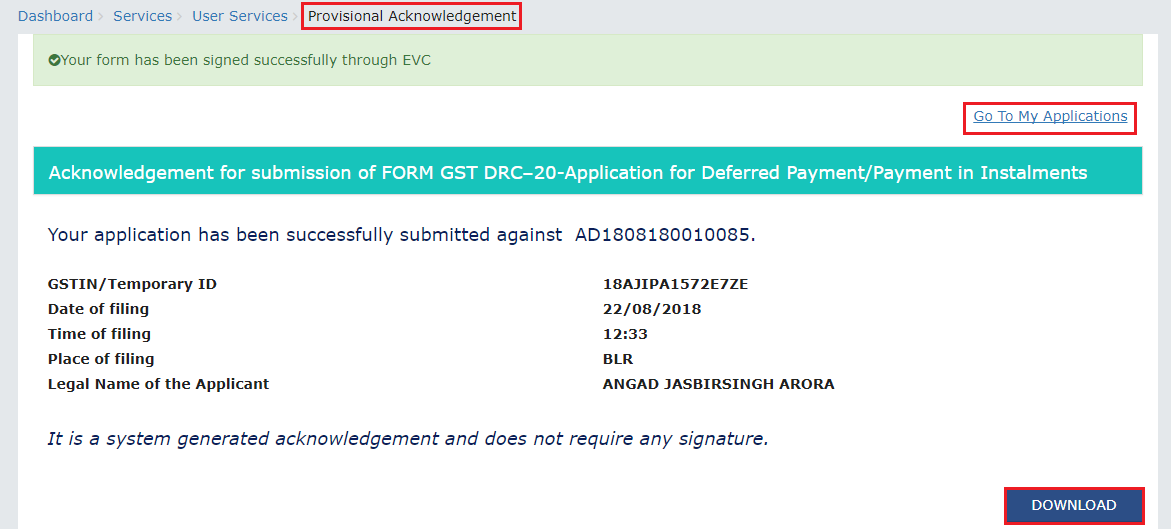
The taxpayer can download the application by clicking on the 'Download' button or by clicking on 'Go to My Applications' link.
Step 12-Applying for Deferred Payment of GST
Step 13: Download the Application
The taxpayer can download the application by clicking on the 'Download' button or by clicking on 'Go to My Applications' link.
How to view filed application
Here are the steps that have to be followed to view the application details.
Step 1: Select the Applications tab On the 'Case Details' page, the taxpayer has to click on the 'Applications' tab, if it is not selected by default. By clicking on this tab, the filed application can be viewed along with its supporting documents in PDF format.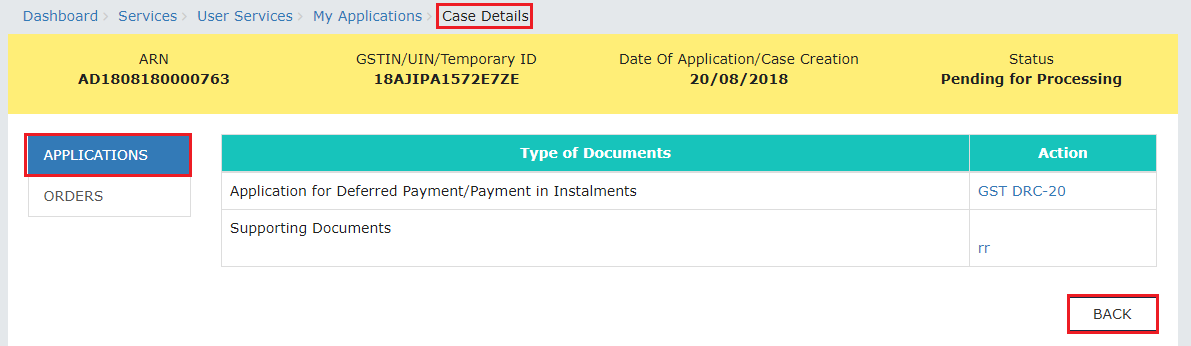 Step 1-Applying for Deferred Payment of GST
Step 2: Download the application
Click 'Back' to go to 'My Applications' page. The taxpayer has to click the documents in the 'Action' column to download and view the application.
Step 1-Applying for Deferred Payment of GST
Step 2: Download the application
Click 'Back' to go to 'My Applications' page. The taxpayer has to click the documents in the 'Action' column to download and view the application.
Viewing the Order Issued on that Application
Step 1: Click the Orders tab On the 'Case Details' page, the taxpayer has to click on the 'Orders' tab. Through this tab, there is an option to view the issued order with all the documents in the PDF format. Step 2: Download the issued order Click the 'View' hyperlink in the 'Action' column to download and view the issued order.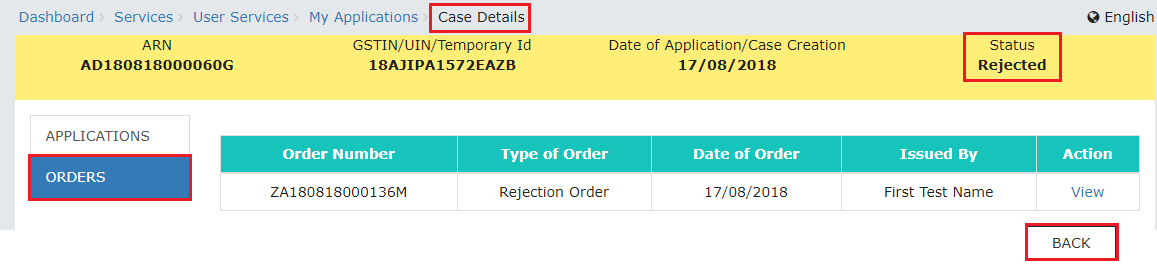 Step 2-Applying for Deferred Payment of GST
If the status of this ARN/ case is 'Rejected' as the officer has rejected this application request. If the status of ARN is updated to 'Approved' in case of acceptance and 'Application approved with modification' in case of modification.
Step 2-Applying for Deferred Payment of GST
If the status of this ARN/ case is 'Rejected' as the officer has rejected this application request. If the status of ARN is updated to 'Approved' in case of acceptance and 'Application approved with modification' in case of modification.
Viewing Instalment Calender
Step 1: Login to the Portal The taxpayer has to login to the official GST portal. Step 2: Enter the Credentials The taxpayer has to enter the appropriate credentials. Step 3: Click on Instalment Calendar From the 'Services' tab, click on the 'Payments' option and click on 'Instalment Calendar'. Step 4: Enter the Demand ID The Demand ID has to be entered and click on the 'Submit' button. The instalment calendar page is displayed.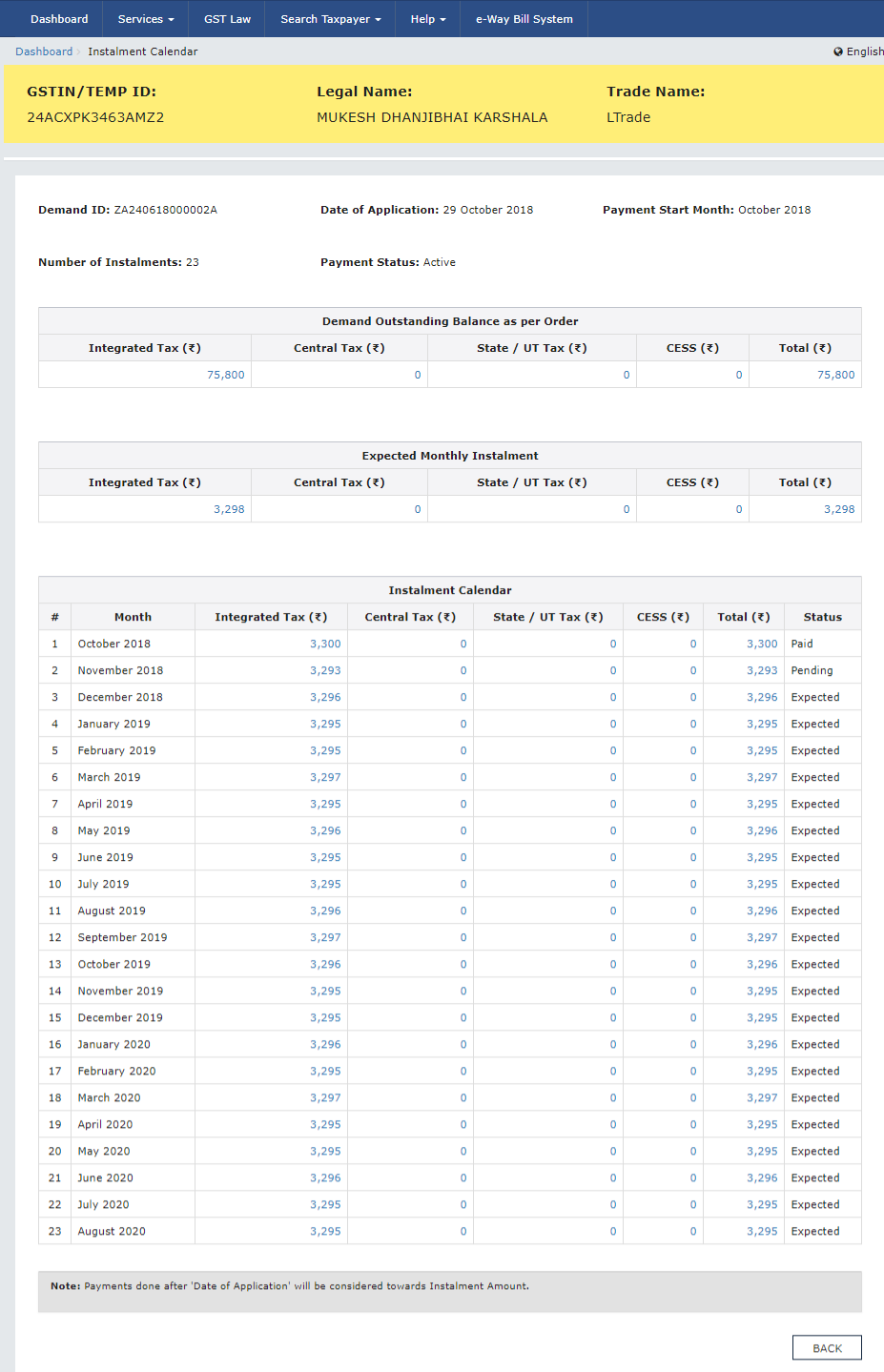 Step 4- Applying for Deferred Payment of GST
Step 5: Click the major head hyperlink
When clicked on the major head hyperlink, the taxpayer can view minor head details.
Step 6: Click the Close button
After viewing, the taxpayer has to click on the close button.
Step 4- Applying for Deferred Payment of GST
Step 5: Click the major head hyperlink
When clicked on the major head hyperlink, the taxpayer can view minor head details.
Step 6: Click the Close button
After viewing, the taxpayer has to click on the close button.