
Karthiga
Expert
Published on: Aug 12, 2026
Chhattisgarh Property Registration
Registration of property in India is mandatory as per the provisions of Indian Registration Act, 1908. The transfer of immovable property has to be registered to obtain the rights of the property on the execution date of the deed. The Department of Registration and Stamp is liable for property registration in the State of Chhattisgarh. In this article, we look at the procedure for Chhattisgarh property registration in detail.Section 25 of the Chhattisgarh Registration Act
As per the Section 25 of the Registration Act, 1969, all documents required for registering a property deed has to be submitted within four months from the date of property registration to the concerned Registrar officer. In case of any violations on above, a fine amounting to 10 times of the amount of property registration fee has to be remitted in such case of property registration.
Benefits of Property Registration
The following advantages can be obtained by registering the property deed.
- To provide a guarantee of the genuineness of the document.
- To afford publicity for transactions.
- To ensure prevention of frauds, conservation of evidence, the transfer of title to the owner.
- To maintain an up to day public record by registering a property.
- To afford the facility of determining whether the property has already been sold.
- To provide security of title deeds and to prove titles in case the original deeds are lost or destroyed.
Documents Required
The required reports are to be furnished along with the application form to register a property in the state of Chhattisgarh.
- Registry Copy of Land or Building
- Copy of Lease
- Copy of Hrin Pustika / Khasra
- Copy of allotment/registry issued related to the land/building by any government department
- Electricity Bill (in case of encroachment).
Property Registration Fee in Chhattisgarh
The prescribed rates for the registration of property in Chhattisgarh are as follows:
Stamp Duty
The stamp duty is the percentage of the transaction value levied by the state government, on every registered sale. To know about stamp duty rates for various transactions in the state of Chhattisgarh is
click here.Procedure for Registering a Property
To register a property in the Chhattisgarh, follow the steps which are explained here:
Visit the Official Website Step 1: Kindly visit the official website of Chhattisgarh Municipal. Select Respective Corporation Step 2: Select your particular corporation from the home screen of the portal and click on the “Go” button.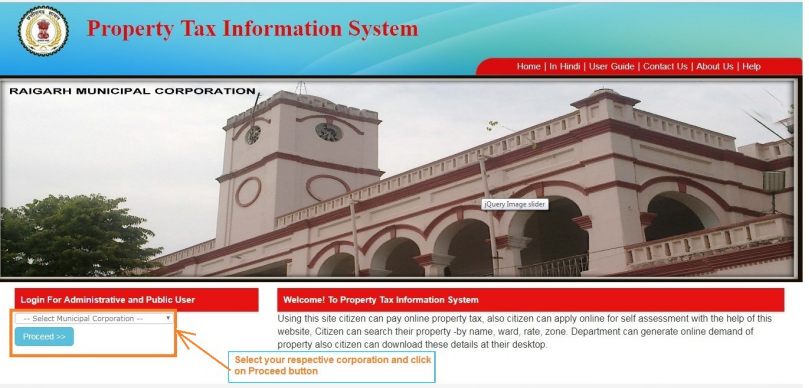 Chhattisgarh Property Registration - Image 1
New Property Registration
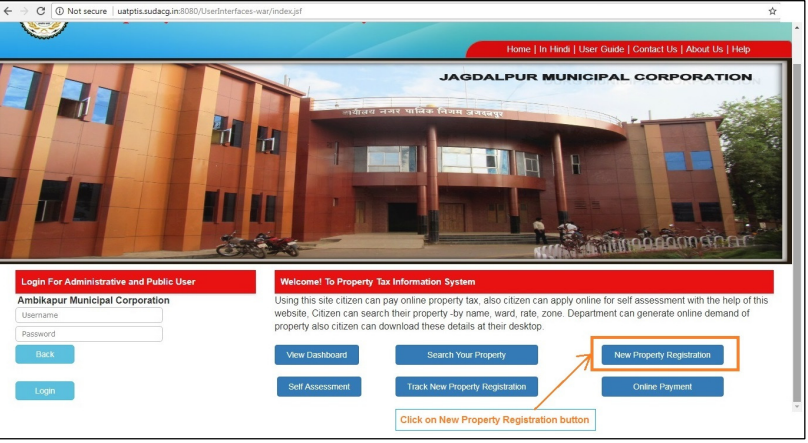
Step 3: Click on “New property registration” tab from the list of option.
Chhattisgarh Property Registration - Image 1
New Property Registration
Step 3: Click on “New property registration” tab from the list of option.
 Chhattisgarh Property Registration - Image 2
Provide New Property Details
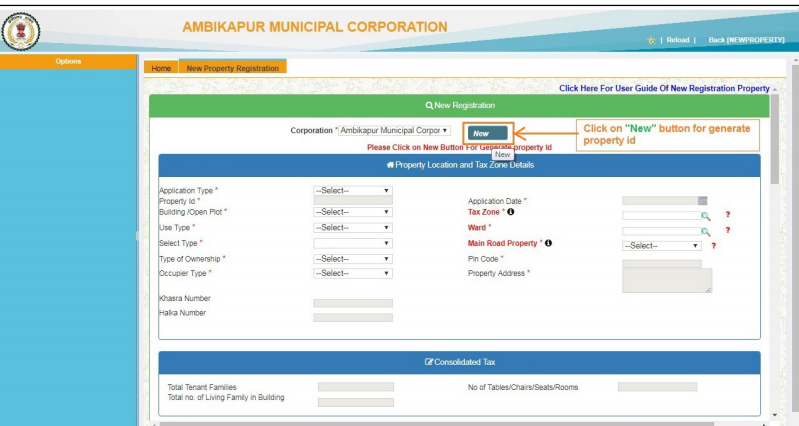
Step 4: The new property registration page will open up the user has to provide the details of the property.
Generate Property ID
Step 5: Now, press “New” button to generate property id.
Chhattisgarh Property Registration - Image 2
Provide New Property Details
Step 4: The new property registration page will open up the user has to provide the details of the property.
Generate Property ID
Step 5: Now, press “New” button to generate property id.
 Chhattisgarh Property Registration - Image 3
Select Property Type
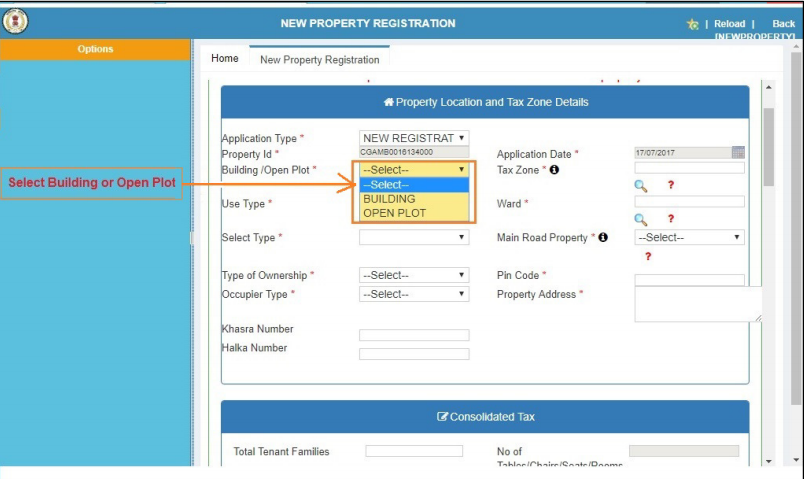
Step 6: Then select your type of property whether the building or open plot.
Chhattisgarh Property Registration - Image 3
Select Property Type
Step 6: Then select your type of property whether the building or open plot.
 Chhattisgarh Property Registration - Image 4
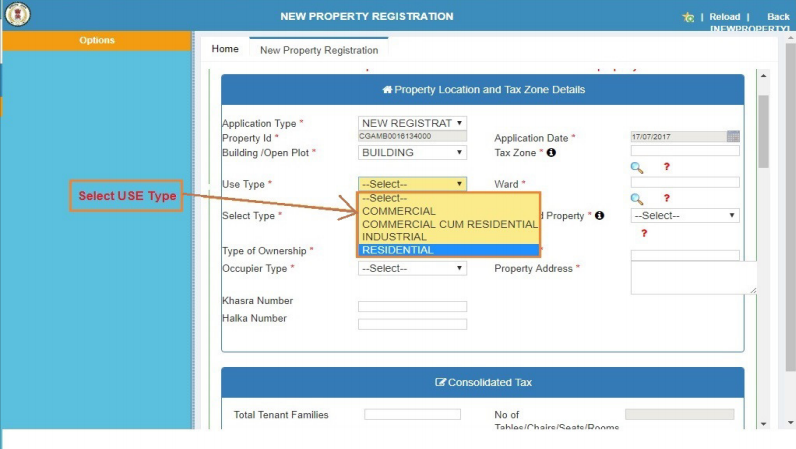
Select Use of Property
Step 7: Select use type of your property whether commercial, commercial cum residential, industrial or residential.
Chhattisgarh Property Registration - Image 4
Select Use of Property
Step 7: Select use type of your property whether commercial, commercial cum residential, industrial or residential.
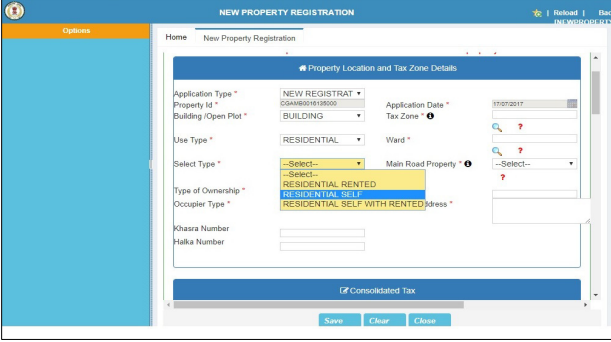
 Chhattisgarh Property Registration - Image 5
Step 8: And then choose the type of category which comes under the property use type.
Chhattisgarh Property Registration - Image 5
Step 8: And then choose the type of category which comes under the property use type.
 Chhattisgarh Property Registration - Image 6
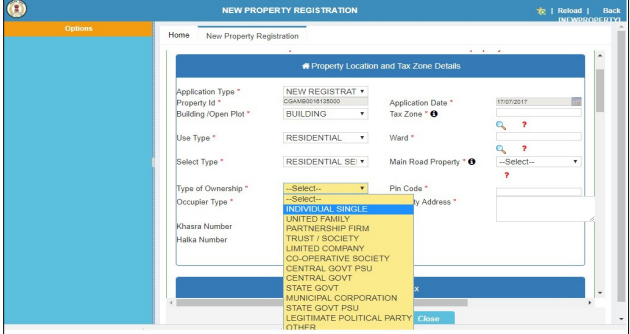
Property Ownership Details
Step 9: Select the type of property ownership from the category which is listed below.
Chhattisgarh Property Registration - Image 6
Property Ownership Details
Step 9: Select the type of property ownership from the category which is listed below.
- Individual single
- United family
- Partnership firm
- Trust/society
- Limited company
- Co-operative society
- Central government PSU
- Central government
- State government
- Municipal Corporation
- State government PSU
- Legitimate political party
- Other
 Chhattisgarh Property Registration - Image 7
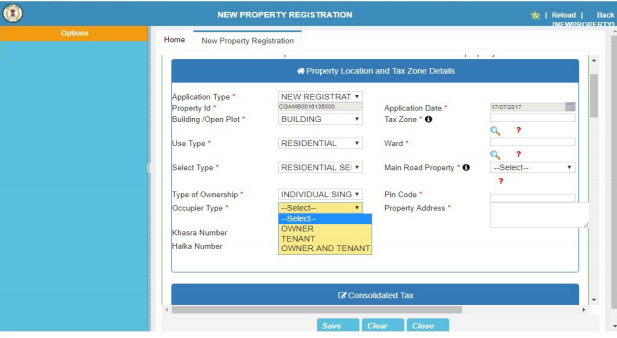
Step 10: Select the occupier type whether the owner, tenant, owner and tenant.
Chhattisgarh Property Registration - Image 7
Step 10: Select the occupier type whether the owner, tenant, owner and tenant.
 Chhattisgarh Property Registration - Image 8
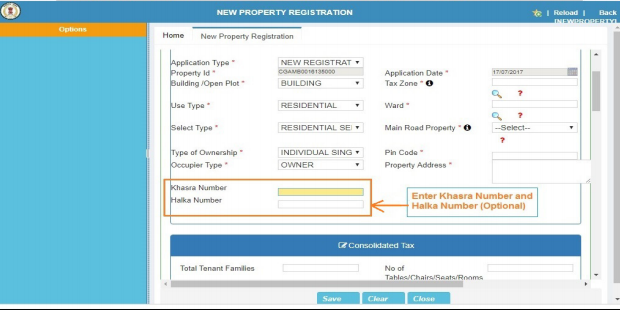
Step 11: Now, enter the Khasra and Halka number if applicable.
Chhattisgarh Property Registration - Image 8
Step 11: Now, enter the Khasra and Halka number if applicable.
 Chhattisgarh Property Registration - Image 9
Tax Zone Details
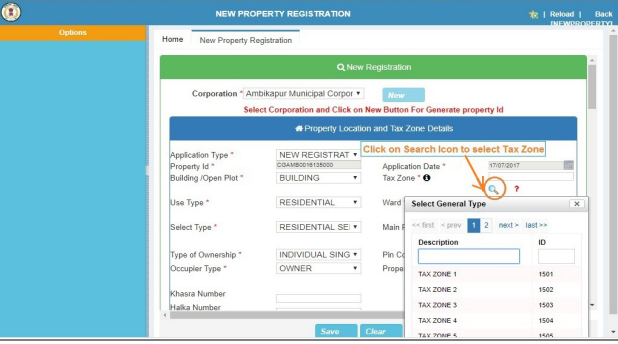
Step 12: Select “Tax zone” if you know your tax zone or else click on “?” to know your tax zone.
Chhattisgarh Property Registration - Image 9
Tax Zone Details
Step 12: Select “Tax zone” if you know your tax zone or else click on “?” to know your tax zone.
 Chhattisgarh Property Registration - Image 10
Generate Ward Number
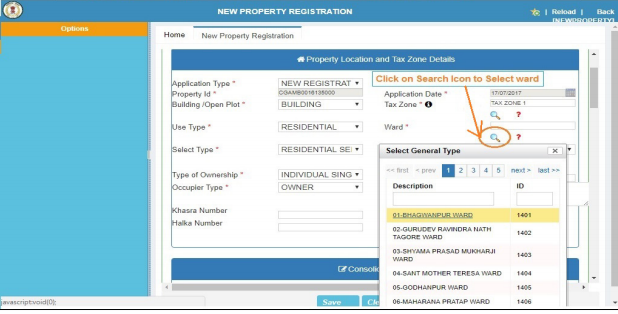
Step 13: Select ward if you know wars number or else click on “?” to know your ward number.
Chhattisgarh Property Registration - Image 10
Generate Ward Number
Step 13: Select ward if you know wars number or else click on “?” to know your ward number.
 Chhattisgarh Property Registration - Image 11
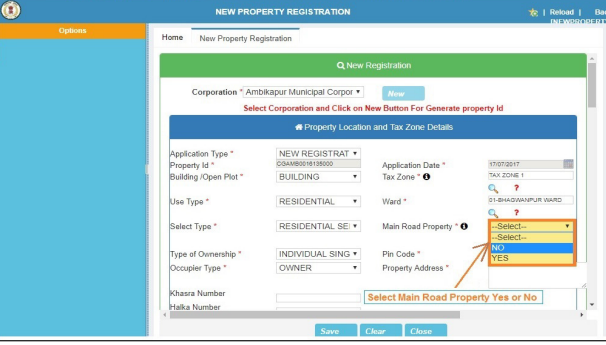
Step 14: Select “yes” or “No” option for the question main road property.
Chhattisgarh Property Registration - Image 11
Step 14: Select “yes” or “No” option for the question main road property.
 Chhattisgarh Property Registration - Image 12
Fill Property Address
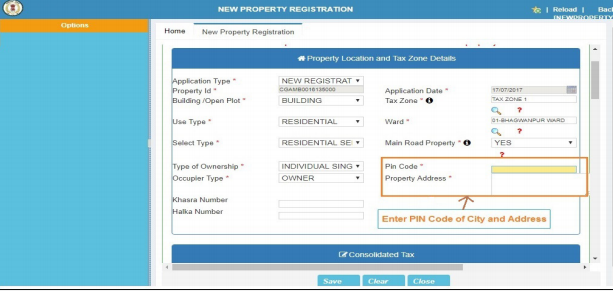
Step 15: Enter the pin code of the city and property address.
Chhattisgarh Property Registration - Image 12
Fill Property Address
Step 15: Enter the pin code of the city and property address.
 Chhattisgarh Property Registration - Image 13
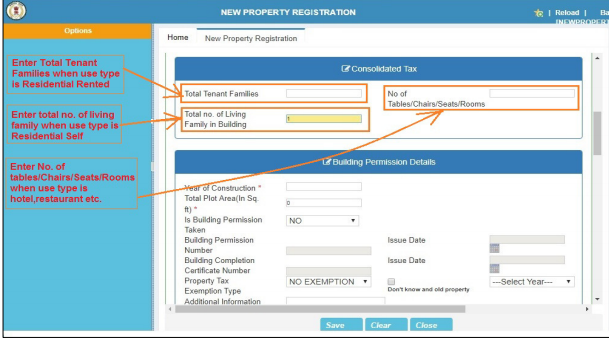
Step 16: Provide the consolidated tax details like no of total tenant families, no of tables, chairs, seats, rooms etc.
Chhattisgarh Property Registration - Image 13
Step 16: Provide the consolidated tax details like no of total tenant families, no of tables, chairs, seats, rooms etc.
 Chhattisgarh Property Registration - Image 14
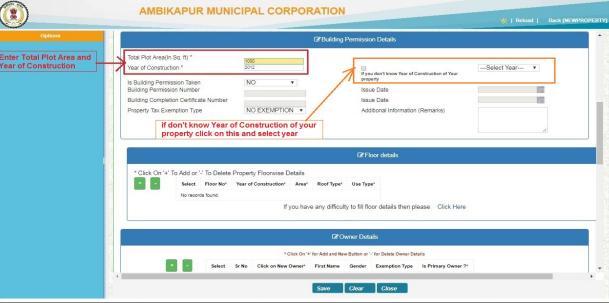
Step 17: Enter the year of construction and total plot area and also the details of building permission if permission for the building is obtained.
Chhattisgarh Property Registration - Image 14
Step 17: Enter the year of construction and total plot area and also the details of building permission if permission for the building is obtained.
 Chhattisgarh Property Registration - Image 15
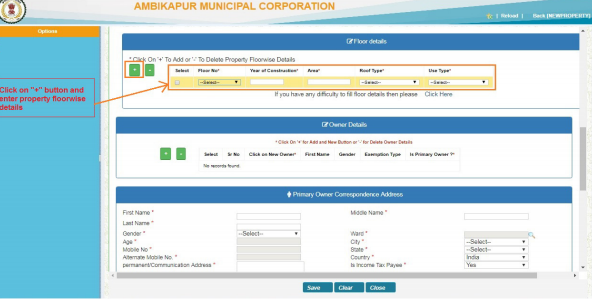
Step 18: Click on ”+” button to add the floor details, and after entering the floor details click on “+” button for add owner details.
Chhattisgarh Property Registration - Image 15
Step 18: Click on ”+” button to add the floor details, and after entering the floor details click on “+” button for add owner details.
 Chhattisgarh Property Registration - Image 16
New Owner Information
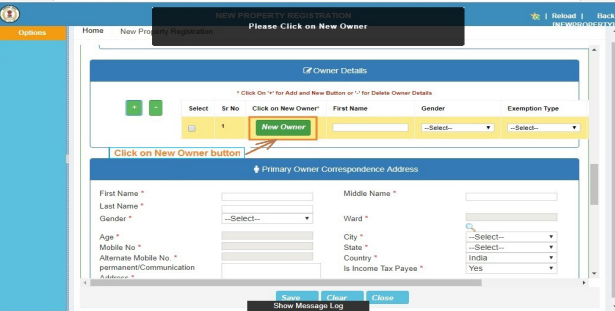
Step 19: Click on “New owner” button to fill owner information.
Chhattisgarh Property Registration - Image 16
New Owner Information
Step 19: Click on “New owner” button to fill owner information.
 Chhattisgarh Property Registration - Image 17
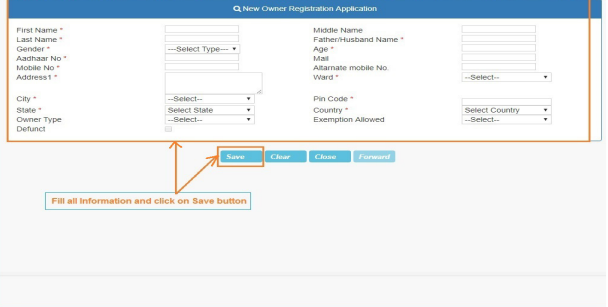
Step 20: After filling all the details and then click on the “Save” button.
Chhattisgarh Property Registration - Image 17
Step 20: After filling all the details and then click on the “Save” button.
 Chhattisgarh Property Registration - Image 18
Step 21: Click on “+” button to enter water connection details if you have a water connection.
Upload the Files
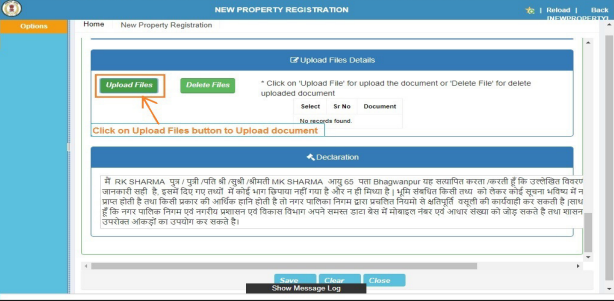
Step 22: Click on “Upload files” button to upload PDF document.
Chhattisgarh Property Registration - Image 18
Step 21: Click on “+” button to enter water connection details if you have a water connection.
Upload the Files
Step 22: Click on “Upload files” button to upload PDF document.
 Chhattisgarh Property Registration - Image 19
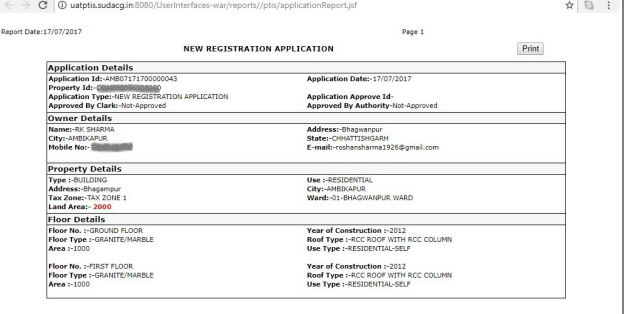
Step 23: Now click on “Save” button to save your property details.
New Registration Report Generation
Step 24: After clicking on save button new registration report will be generated on the next page.
Chhattisgarh Property Registration - Image 19
Step 23: Now click on “Save” button to save your property details.
New Registration Report Generation
Step 24: After clicking on save button new registration report will be generated on the next page.
 Chhattisgarh Property Registration - Image 20
Track Registered Property Status
The applicant can know the state of the application online by following the below mentioned steps:
Revisit the Portal Step 1: The applicant has to revisit the portal. Select Corporation Type Step 2: Select your respective corporation and click on the “Proceed” button. Step 3: Click on “Track New Property Registration” button.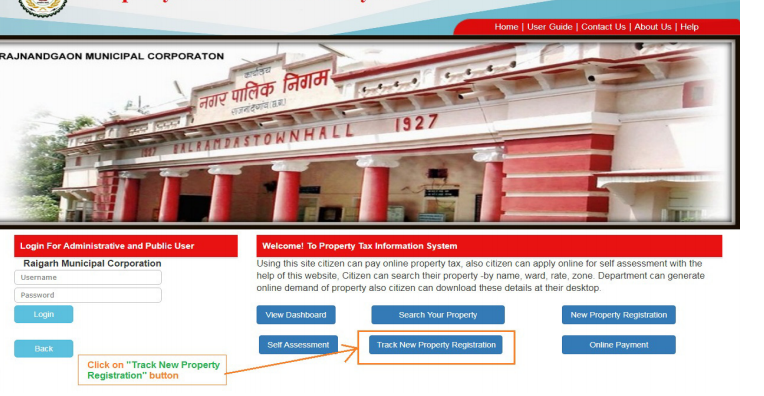 Chhattisgarh Property Registration - Track Application
Provide Application ID
Step 4: Enter Application Id and click on "Search" button.
View Property Status
Step 5: Now you can check the status of the document. New registered property is approved or pending at the department level.
Chhattisgarh Property Registration - Track Application
Provide Application ID
Step 4: Enter Application Id and click on "Search" button.
View Property Status
Step 5: Now you can check the status of the document. New registered property is approved or pending at the department level.