IndiaFilings

Published on: Jun 24, 2026

How to Change Gst Mobile Number

The GST Portal utilises various safeguards to ensure that there is no misuse of the GST account of a taxpayer. Hence, during the

GST registration process

, a mobile number is requested on the GST Portal and OTP verification is completed. After obtaining GST registration, the GST Portal sends the OTP for various transactions like making GST payment, filing GST returns, allowing GST API access, etc., Hence, its important for the taxpayer to provide a permanent and readily available mobile number during the GST registration process. Due to various reasons, if you would now like to change the GST mobile number, follow the steps below:

Step 1: Check your GST Registration Certificate

To Change Gst Mobile Number, the relevant jurisdictional Tax Officer must be approached. To find GST jurisdiction, see the GST registration certificate issued to you or in the GST Portal under the My Profile section. Choose the jurisdiction under which the GST registration obtained.
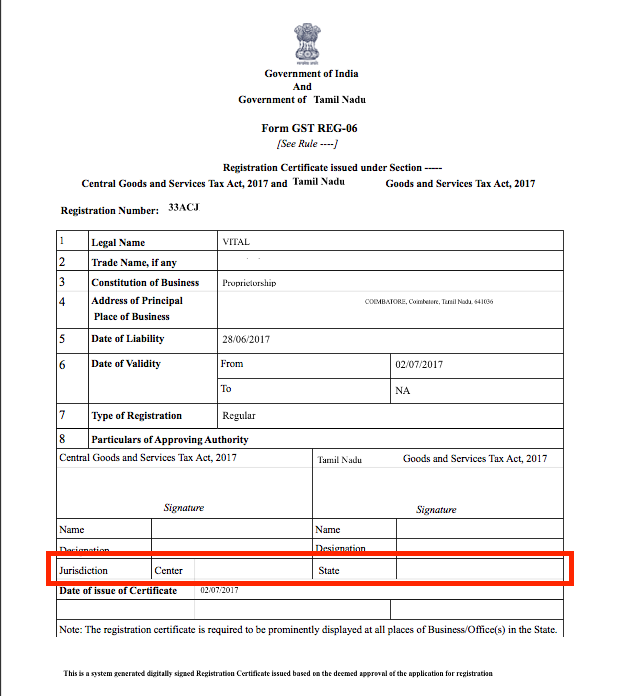
Find GST Jurisdiction

Find GST Jurisdiction

Step 2: Approach the Relevant Jurisdictional Tax Officer

Once you have determined the relevant Jurisdictional Tax Officer, approach the Officer or the nearest

GST Seva Kendra

with the relevant documents. You will have to provide documents like identity proof, address proof, board resolution for change of mobile number and other relevant documents to validate the business details related to your GSTIN. The concerned GST officer verifies the status of the concerned as to whether a Stakeholder or Authorized Signatory for that GSTIN in the GST system. After making a positive identification, the GST officer shall upload sufficient proof in support to authenticate the change of GST mobile number on the GST Portal.

Step 3: GST Mobile Number Changed

After resetting or changing the mobile number on the GST portal, username and temporary password reset automatically and the portal sends the details to the registered email address on the GSTIN. After resetting and logging into the portal for the first time, the user shall provide the new user name and password using the link sent to the e-mail address of the Primary Authorized Signatory.

Powers of Jurisdictional Officer

The GST Jurisdictional Officer only has powers to change the mobile number linked to an existing Authorised signatory. In case a new Authorised Signatory must be added, then the taxpayer must follow the procedure for GST amendment. Also, a Jurisdictional Officer can mark an existing promoter/ partner as a Primary Authorized Signatory after proper authentication, if the GST amendment process is completed. Learn about

GST Registration

or

GST Return Filing
Back to Learn

Frequently Asked Questions

Common questions about Change GST Mobile Number.

To change your registered mobile number on the GST portal, you need to approach the relevant Jurisdictional Tax Officer or the nearest GST Seva Kendra with the required documents, such as identity proof, address proof, and board resolution for the change of mobile number. The Tax Officer will verify your details and upload the necessary proof to authenticate the change of GST mobile number on the GST portal.
To change the GST mobile number, you will need to provide the following documents to the Jurisdictional Tax Officer: identity proof, address proof, board resolution for the change of mobile number, and any other relevant documents to validate your business details related to your GSTIN.
No, you cannot change your GST mobile number online directly on the GST portal. You must approach the relevant Jurisdictional Tax Officer or the nearest GST Seva Kendra in person with the required documents for verification and authentication purposes.
Yes, after resetting or changing the mobile number on the GST portal, your username and temporary password will be reset automatically. The GST portal will send the new login details to the registered email address associated with your GSTIN.
No, the Jurisdictional Tax Officer has the authority to change the mobile number linked to an existing Authorized Signatory only. To add a new Authorized Signatory, you must follow the procedure for GST amendment separately.
Yes, a Jurisdictional Officer can mark an existing promoter or partner as a Primary Authorized Signatory after proper authentication, provided the GST amendment process is completed.
The article does not provide specific information on the timeline for the GST mobile number change to reflect on the portal. However, it is advisable to inquire with the Jurisdictional Tax Officer or GST Seva Kendra for an estimated timeline based on their procedures.
The article does not mention any fee or charge for changing the GST mobile number. However, it is recommended to check with the Jurisdictional Tax Officer or GST Seva Kendra regarding any applicable fees or charges for the process.
If you provide incorrect or incomplete documents for changing the GST mobile number, the Jurisdictional Tax Officer may not be able to verify and authenticate your request. It is essential to provide accurate and complete documentation to ensure a smooth process.
The article does not specifically address the process for changing the GST mobile number for multiple GSTINs simultaneously. It is advisable to consult with the Jurisdictional Tax Officer or GST Seva Kendra regarding the procedures and requirements for changing the mobile number for multiple GSTINs, if applicable.