IndiaFilings

Published on: Jun 24, 2026

How to Change Gst Email

During the

GST registration process

, an email and mobile number of the authorised signatory is obtained and verified. To ensure that there is sufficient notice for major transactions to the authorised signatory, the GSTN sends the details to the registered email address provided at during the time of registrations. In some cases, the authorised signatory might wish to change the GST email id provided. In such cases, you can follow the steps provided below:

Step 1: Find your GST Jurisdiction

To Change Gst Email of the authorised signatory, the relevant jurisdictional Tax Officer must be approached. You can find GST jurisdiction, in the GST Portal under the My Profile section or on your

GST registration certificate.

Find the nearest GST Office and the concerned officer based on your Jurisdiction.
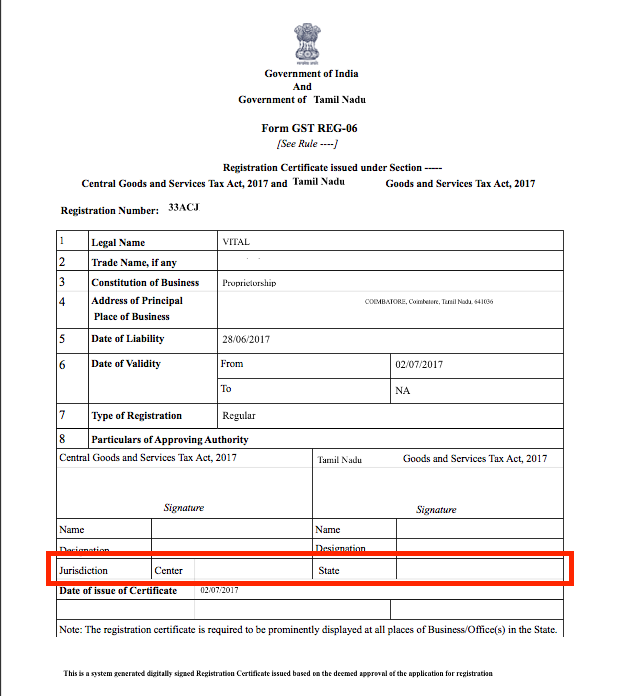
Find GST Jurisdiction

Find GST Jurisdiction

Step 2: Visit the GST Office

Once you have determined the relevant Jurisdictional Tax Officer and office, approach the Officer or the nearest

GST Seva Kendra

with the relevant documents. The taxpayer shall provide documents such as identity proof, address proof, board resolution for change of email id and other relevant documents to validate the change of email id on GST Portal. The concerned GST officer shall verify the status of the person whether the individual belongs to a Stakeholder or Authorized Signatory for that GSTIN in the system. After making a positive identification, the GST officer uploads the sufficient proof in support to authenticate the change of GST email id on the GST Portal and complete the process.

Step 3: GST Email ID Changed

After the change of email id on the GST portal, the Portal sends a confirmation message to the new email address as entered by the Tax Officer in your jurisdiction. After the change, you will have to log in to the GST Portal and log in using the First time login link. After logging into the Portal for the first time the taxpayer shall enter the username and password using the data emailed to the updated e-mail address of the Primary Authorized Signatory. After setting the password, the GST Portal registers the new e-mail address.

Powers of Jurisdictional Officer

The GST Jurisdictional Officer only has powers to change the email id linked to an existing Authorised signatory. In case a new Authorised Signatory must be added, then the taxpayer must follow the procedure for GST amendment. Also, a Jurisdictional Officer can mark an existing promoter/ partner as a Primary Authorized Signatory after proper authentication, if the GST amendment process is completed. Learn more about

GST Registration

or

GST Return Filing
Back to Learn

Frequently Asked Questions

Common questions about Change GST Email for Authorized Signatory in India.

To change the GST email ID, you need to approach the relevant jurisdictional Tax Officer with the required documents like identity proof, address proof, board resolution for the change of email ID, and other supporting documents. The Tax Officer will verify your details, authenticate the change request, and update the new email ID on the GST Portal.
You will need to provide documents such as identity proof, address proof, board resolution for the change of email ID, and any other relevant documents that the jurisdictional Tax Officer may require to validate the change of email ID on the GST Portal.
No, you cannot change the GST email ID online on your own. It is mandatory to approach the relevant jurisdictional Tax Officer, provide the necessary documents, and get the change authenticated and updated on the GST Portal by the Tax Officer.
The jurisdictional Tax Officer has the authority to change only the email ID linked to an existing Authorized Signatory. If you need to add a new Authorized Signatory or make changes to the existing ones, you must follow the procedure for GST amendment.
After the change of email ID on the GST Portal, the Portal sends a confirmation message to the new email address. You will then have to log in to the GST Portal using the First time login link and set a new password. The new email ID will be registered as the Primary Authorized Signatory's email ID.
The article does not specify the exact timeline for the GST email ID change to reflect on the GST Portal. However, it is expected to be a relatively quick process once the jurisdictional Tax Officer authenticates and updates the change on the Portal.
The article does not mention the process for changing the GST email ID for multiple GSTINs. However, it is likely that you will need to approach the respective jurisdictional Tax Officers for each GSTIN and follow the process individually for each GST registration.
The article does not mention any specific fees for changing the GST email ID. However, it is advisable to check with the relevant jurisdictional Tax Officer if any charges or fees are applicable for the process.
If the jurisdictional Tax Officer refuses to change the GST email ID, you should politely inquire about the reason for the refusal and see if you can provide any additional documents or clarifications to address their concerns. If the issue persists, you may need to escalate the matter to a higher authority or seek assistance from a GST professional.
The article does not mention any specific limitations or restrictions on how frequently you can change the GST email ID. However, it is advisable to avoid frequent changes unless absolutely necessary, as it may raise concerns or create confusion in the GST compliance process.